Bypass Flutter Android Application

What is Flutter?
Flutter is an open-source user interface framework for building cross-platform applications. You can create apps for Android, iOS, Web, Windows, macOS, and Linux from a single codebase.
Flutter uses Dart, a language developed by Google.
Why HTTP Proxy Doesn’t Work in Flutter
- Flutter uses its own Dart-native networking library — not
HttpURLConnection,OkHttp, or other Android component. - It also ignores Android Wi-Fi proxy settings and environment variables like
http_proxy/https_proxy - After DNS resolution, Dart opens a socket directly with
Socket.connect(), bypassing any system-level proxy interception. - Dart ignores system proxy settings and establishes raw TCP connections that bypass Burp’s interception.
Intercepting Network Traffic for Flutter Apps
reFlutter is the answer. What reFlutter do? reFlutter reverse engineering the Flutter using Flutter library which is already complied. This library modifies the snapshot deserialization process to let you perform dynamic analysis
Let’s do that.
Install the reFutter app. To install run below command.
1
$ pip3 install reflutter
Once installed, run below command to analyze/modify the apk file. It will ask burusuite IP or machine IP.
1
$ reflutter <apk_name>.apk
1
2
3
4
5
6
7
8
9
10
11
12
13
14
15
16
┌──(root㉿silentscreamr)-[~]
└─# reflutter '/root/Desktop/app-uat-release.apk'
[*] Processing...

Example: (192.168.1.154) etc.
Please enter your BurpSuite IP: 192.168.18.39

SnapshotHash: 80a49c7111088100a233b2ae788e1f48
The resulting apk file: ./release.RE.apk
Please sign, align & install the apk file

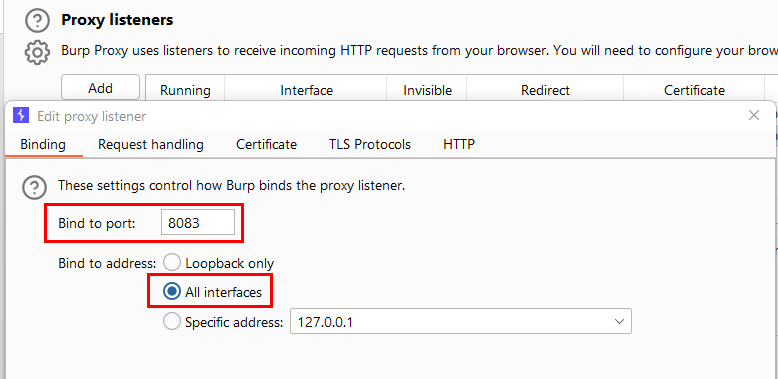
Configure Burp Suite proxy server to listen on *:8083
Proxy Tab -> Options -> Proxy Listeners -> Edit -> Binding Tab

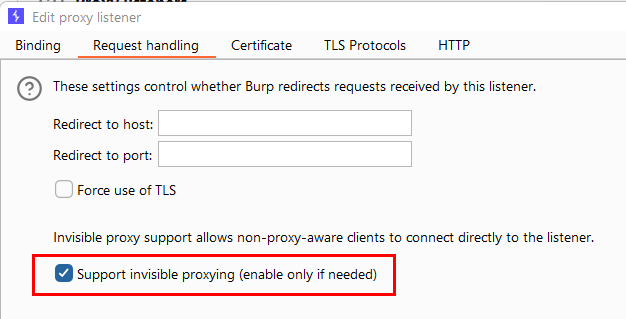
Then enable invisible proxying in Request Handling Tab
Support Invisible Proxying -> true
reFlutter tool automatically select the port 8083 to intercept the network traffic.
Once whole process is completed, it generates another apk file name, release.RE.apk.
After that we will sign the generated apk file using Uber Apk Signer and save it with any name. To sign run below command
1
$ java -jar uber-apk-signer-1.3.0.jar -a release.RE.apk -out release.RE.signed
1
2
3
4
5
6
7
8
9
10
11
12
13
14
15
16
17
18
19
20
21
22
23
24
25
26
27
28
29
┌──(root㉿silentscreamr)-[~/Desktop/android]
└─# java -jar uber-apk-signer-1.3.0.jar -a release.RE.apk -out release.RE.signed
Picked up _JAVA_OPTIONS: -Dawt.useSystemAAFontSettings=on -Dswing.aatext=true
source:
        /root/Desktop/android
zipalign location: PATH
        /usr/bin/zipalign
keystore:
        [0] 161a0018 /tmp/temp_3007052007272290445_debug.keystore (DEBUG_EMBEDDED)

01. release.RE.apk

        SIGN
        file: /root/Desktop/android/release.RE.apk (94.61 MiB)
        checksum: 126c0ad09f05cd5ac0553389198173168b912a6a9b6e1639c53d2659be523073 (sha256)
        - zipalign success
        - sign success

        VERIFY
        file: /root/Desktop/android/release.RE.signed/release.RE-aligned-debugSigned.apk (94.68 MiB)
        checksum: c5c0348274c9e07405cb9f3d8baadeb2c256b5911b0ddba2502b4279d50deae3 (sha256)
        - zipalign verified
        - signature verified [v2, v3]
                Subject: CN=Android Debug, OU=Android, O=US, L=US, ST=US, C=US
                SHA256: 1e08a903aef9c3a721510b64ec764d01d3d094eb954161b62544ea8f187b5953 / SHA256withRSA
                Expires: Fri Mar 11 01:40:05 IST 2044

[Thu Oct 09 22:13:22 IST 2025][v1.3.0]
Successfully processed 1 APKs and 0 errors in 14.14 seconds.
Inside release.RE.signed directory we have our signed apk file, now installed it in the emulator/device.
Configure burpsuite using port 8083 which set by reFlutter app and select All interfaces.
Configure Burpsuite
Now, In Request handling tab select Support invisible proxy.
Run the application, now data is intercepting.